Over a decade of expertise as an Oracle DBA, Application DBA, OCI Admin, and Fusion Middleware specialist, I’ve solved complex challenges, optimized systems, and led innovations across diverse Oracle platforms. Now, I’m passionate about sharing insights to bridge the gap between theory and practice. From database optimization to middleware best practices, join me as we explore Oracle technologies and grow together. Stay tuned for expert tips and resources!
Saturday, 20 February 2016
Patching procedure in oracle apps R12.2
From R12.2 onwards oracle has introduced online patching functionality.
Phases of ADOP(online patching):
In R12.2.0 we have ADOP – AD Online Patching instead of adpatch. There are five phases or life cycles of ADOP which are:
1) PREPARE
2) APPLY
3) FINALIZE
4) CUTOVER
5) CLEANUP
1. Prepare phase - Used to start a new online patching cycle.
$ adop phase=prepare
2. Apply phase - Used to apply one or more patches to the patch edition of an Oracle E-Business Suite system:
$ adop phase=apply patches=637432,654376 workers=8
3. Finalize phase - Used to perform the final patching operations that can be executed while the application is still online:
$ adop phase=finalize
4. Cutover phase - Used to perform the transition to the patched environment:
$ adop phase=cutover
5. Cleanup phase - Used to remove old objects that are no longer needed:
$ adop phase=cleanup
Abort command:
If necessary, an online patching cycle can be terminated, with the actions taken being discarded.
The command to perform this operation is:
$ adop phase=abort
The Online Patching Cycle:
(Note: This abort command is only available up to (but not including) the cutover phase. After cutover, the system is running on the new edition, and abort is no longer possible for that patching cycle.)
Thursday, 18 February 2016
Current Patchset level of oracle apps R12
Below script or steps to know the current Patchset level of oracle apps R12.
Back-end:
Step 1:
Source the .env file of oracle application
Step 2:
Run the below query.
$AD_TOP/sql/adutconf.sql
Front-end:
Login to Oracle Application
Goto System Administrator (Responsibility)
---- > Goto OAM (Oracle Application Manager)
----> OAM Support Cart
----> Support Cart
----> Application Signature
----> Collect
----> Check the Product Information box
----> Click on View (eyeglasses)
Back-end:
Step 1:
Source the .env file of oracle application
Step 2:
Run the below query.
$AD_TOP/sql/adutconf.sql
Front-end:
Login to Oracle Application
Goto System Administrator (Responsibility)
---- > Goto OAM (Oracle Application Manager)
----> OAM Support Cart
----> Support Cart
----> Application Signature
----> Collect
----> Check the Product Information box
----> Click on View (eyeglasses)
Wednesday, 3 February 2016
Unexpected Error On R12.2 Home Page
Error Message:
(WebAppServletContext.java:2181)
at weblogic.servlet.internal.ServletRequestImpl.run(ServletRequestImpl.java:1491)
at weblogic.work.ExecuteThread.execute(ExecuteThread.java:256)
at weblogic.work.ExecuteThread.run(ExecuteThread.java:221)
Caused by: org.xml.sax.SAXParseException; systemId: /oracle/apps/fnd/attributesets/Buttons; lineNumber: 1; columnNumber: 40; /oracle/apps/fnd/attributesets/Buttons<Line 1, Column 40>: XML-20108: (Fatal Error) Start of root element expected.
at oracle.xml.parser.v2.XMLError.flushErrorHandler(XMLError.java:422)
at oracle.xml.parser.v2.XMLError.flushErrors1(XMLError.java:287)
at oracle.xml.parser.v2.NonValidatingParser.parseRootElement(NonValidatingParser.java:414)
at oracle.xml.parser.v2.NonValidatingParser.parseDocument(NonValidatingParser.java:355)
at oracle.xml.parser.v2.XMLParser.parse(XMLParser.java:226)
at oracle.cabo.share.xml.ParserAdapter.parse(Unknown Source)
at oracle.cabo.share.xml.TreeBuilder.parse(Unknown Source)
at oracle.adf.mds.internal.parse.ParserUtils.createNode(ParserUtils.java:283)
at oracle.adf.mds.internal.parse.ParserUtils.createNode(ParserUtils.java:115)
at oracle.adf.mds.adapters.DBAdapter.getElementData(DBAdapter.java:324)
Cause:
org.xml.sax.SAXParseException; systemId: /oracle/apps/fnd/attributesets/Buttons; lineNumber: 1; columnNumber: 40; /oracle/apps/fnd/attributesets/Buttons<Line 1, Column 40>: XML-20108: (Fatal Error) Start of root element expected.
at oracle.xml.parser.v2.XMLError.flushErrorHandler(XMLError.java:422)
at oracle.xml.parser.v2.XMLError.flushErrors1(XMLError.java:287)
at oracle.xml.parser.v2.NonValidatingParser.parseRootElement(NonValidatingParser.java:414)
at oracle.xml.parser.v2.NonValidatingParser.parseDocument(NonValidatingParser.java:355)
at oracle.xml.parser.v2.XMLParser.parse(XMLParser.java:226)
at oracle.cabo.share.xml.ParserAdapter.parse(Unknown Source)
at oracle.cabo.share.xml.TreeBuilder.parse(Unknown Source)
Cause:
The SQL profiles are setting optimizer_features_enable to 10.1.0.5 and this setting is not going to work with EBR , which is an 11g feature.
This is explained in:
Bug 19830345 - QUERY RETURNS NO ROWS AGAINST SOME TABLES PROTECTED BY VPD
Fix:
1. run this query to discover all the profiles that set the OFE parameter to 10.1.0.5 :
SELECT o.name, d.comp_data
FROM SQLOBJ$ o, SQLOBJ$DATA d
WHERE o.signature = d.signature
AND o.category = d.category
and COMP_DATA like '%10.1%'
ORDER BY o.name;
2. For each o.name run this :
exec DBMS_SQLTUNE.DROP_SQL_PROFILE ( '')
3) Re-test the issue.
Ref. (Doc ID 1937429.1)
(WebAppServletContext.java:2181)
at weblogic.servlet.internal.ServletRequestImpl.run(ServletRequestImpl.java:1491)
at weblogic.work.ExecuteThread.execute(ExecuteThread.java:256)
at weblogic.work.ExecuteThread.run(ExecuteThread.java:221)
Caused by: org.xml.sax.SAXParseException; systemId: /oracle/apps/fnd/attributesets/Buttons; lineNumber: 1; columnNumber: 40; /oracle/apps/fnd/attributesets/Buttons<Line 1, Column 40>: XML-20108: (Fatal Error) Start of root element expected.
at oracle.xml.parser.v2.XMLError.flushErrorHandler(XMLError.java:422)
at oracle.xml.parser.v2.XMLError.flushErrors1(XMLError.java:287)
at oracle.xml.parser.v2.NonValidatingParser.parseRootElement(NonValidatingParser.java:414)
at oracle.xml.parser.v2.NonValidatingParser.parseDocument(NonValidatingParser.java:355)
at oracle.xml.parser.v2.XMLParser.parse(XMLParser.java:226)
at oracle.cabo.share.xml.ParserAdapter.parse(Unknown Source)
at oracle.cabo.share.xml.TreeBuilder.parse(Unknown Source)
at oracle.adf.mds.internal.parse.ParserUtils.createNode(ParserUtils.java:283)
at oracle.adf.mds.internal.parse.ParserUtils.createNode(ParserUtils.java:115)
at oracle.adf.mds.adapters.DBAdapter.getElementData(DBAdapter.java:324)
Cause:
org.xml.sax.SAXParseException; systemId: /oracle/apps/fnd/attributesets/Buttons; lineNumber: 1; columnNumber: 40; /oracle/apps/fnd/attributesets/Buttons<Line 1, Column 40>: XML-20108: (Fatal Error) Start of root element expected.
at oracle.xml.parser.v2.XMLError.flushErrorHandler(XMLError.java:422)
at oracle.xml.parser.v2.XMLError.flushErrors1(XMLError.java:287)
at oracle.xml.parser.v2.NonValidatingParser.parseRootElement(NonValidatingParser.java:414)
at oracle.xml.parser.v2.NonValidatingParser.parseDocument(NonValidatingParser.java:355)
at oracle.xml.parser.v2.XMLParser.parse(XMLParser.java:226)
at oracle.cabo.share.xml.ParserAdapter.parse(Unknown Source)
at oracle.cabo.share.xml.TreeBuilder.parse(Unknown Source)
Cause:
The SQL profiles are setting optimizer_features_enable to 10.1.0.5 and this setting is not going to work with EBR , which is an 11g feature.
This is explained in:
Bug 19830345 - QUERY RETURNS NO ROWS AGAINST SOME TABLES PROTECTED BY VPD
Fix:
1. run this query to discover all the profiles that set the OFE parameter to 10.1.0.5 :
SELECT o.name, d.comp_data
FROM SQLOBJ$ o, SQLOBJ$DATA d
WHERE o.signature = d.signature
AND o.category = d.category
and COMP_DATA like '%10.1%'
ORDER BY o.name;
2. For each o.name run this :
exec DBMS_SQLTUNE.DROP_SQL_PROFILE ( '')
3) Re-test the issue.
Ref. (Doc ID 1937429.1)
R12: "FRM-92101:There was a failure in the Forms Server during startup" Error When Attempting to Launch Forms
We are facing an error when Attempting to launch forms in oracle application R12.
Issue:
FRM-92101 : There was a failure in the Forms Server during startup.
This could happen due to invalid configuration. Please look into the web-server log file for details.
Details...
Java Exception:
oracle.forms.net.ConnectionException: Forms session <3> failed during startup: no response from runtime process
at oracle.forms.net.ConnectionException.CreateConnectionException(Unknown Source)
Cause:
The forms executable was not relinked successfully. The "failed during startup: no response from runtime process" error message occurs when first trying to initialize the forms process versus actually performing a forms function.
The most common cause for the failed relink is that the file "ldflags" in $ORACLE_HOME/lib32 is missing or pointing to an incorrect location.
Fix:
Step 1:
$ cd $ORACLE_HOME/lib32
$ rm ldflags
$ ln -s $ORACLE_HOME/lib/ldflags ldflags
Step 2:
Stop the web tier services (adopmnctl.sh stop) and relink the form executable.
$ cd $ORACLE_HOME/forms/lib32/
$ make -f ins_forms.mk install
Step 3:
Start the web tier services (adiopmnctl.sh start) and launch the forms.
Ref. (Doc ID 454427.1)
Issue:
FRM-92101 : There was a failure in the Forms Server during startup.
This could happen due to invalid configuration. Please look into the web-server log file for details.
Details...
Java Exception:
oracle.forms.net.ConnectionException: Forms session <3> failed during startup: no response from runtime process
at oracle.forms.net.ConnectionException.CreateConnectionException(Unknown Source)
Cause:
The forms executable was not relinked successfully. The "failed during startup: no response from runtime process" error message occurs when first trying to initialize the forms process versus actually performing a forms function.
The most common cause for the failed relink is that the file "ldflags" in $ORACLE_HOME/lib32 is missing or pointing to an incorrect location.
Fix:
Step 1:
$ cd $ORACLE_HOME/lib32
$ rm ldflags
$ ln -s $ORACLE_HOME/lib/ldflags ldflags
Step 2:
Stop the web tier services (adopmnctl.sh stop) and relink the form executable.
$ cd $ORACLE_HOME/forms/lib32/
$ make -f ins_forms.mk install
Step 3:
Start the web tier services (adiopmnctl.sh start) and launch the forms.
Ref. (Doc ID 454427.1)
Friday, 29 January 2016
Script for concurrent request details using Request Id
Below script for running concurrent request details using Request Id.
Script:
set head off
set verify off
set echo off
set pages 1500
set linesize 100
set lines 120
prompt
prompt Request_ID
prompt ==================================
select /*+ CHOOSE*/
'Session Id.............................................: '||s.sid,
'Serial Num..............................................: '||s.serial#,
'User Name ..............................................: '||s.username,
'Session Status .........................................: '||s.status,
'Client Process Id on Client Machine ....................: '||'*'||s.process||'*' Client,
'Server Process ID ......................................: '||p.spid Server,
'Sql_Address ............................................: '||s.sql_address,
'Sql_hash_value .........................................: '||s.sql_hash_value,
'Schema Name ..... ......................................: '||s.SCHEMANAME,
'Program ...............................................: '||s.program,
'Module .................................................: '|| s.module,
'Action .................................................: '||s.action,
'Terminal ...............................................: '||s.terminal,
'Client Machine .........................................: '||s.machine,
'LAST_CALL_ET ...........................................: '||s.last_call_et,
'S.LAST_CALL_ET/3600 ....................................: '||s.last_call_et/3600,
'E.SQL_TEXT .............................................: '||E.SQL_TEXT
from v$session s, v$process p, V$SQL E
where p.addr=s.paddr AND s.SQL_ADDRESS = E.ADDRESS and
s.sid in (SELECT d.sid FROM apps.fnd_concurrent_requests a,
apps.fnd_concurrent_processes b, v$process c,v$session d
WHERE a.controlling_manager = b.concurrent_process_id
AND c.pid = b.oracle_process_id
AND b.session_id=d.audsid
AND a.request_id = &Request_ID);
Script:
set head off
set verify off
set echo off
set pages 1500
set linesize 100
set lines 120
prompt
prompt Request_ID
prompt ==================================
select /*+ CHOOSE*/
'Session Id.............................................: '||s.sid,
'Serial Num..............................................: '||s.serial#,
'User Name ..............................................: '||s.username,
'Session Status .........................................: '||s.status,
'Client Process Id on Client Machine ....................: '||'*'||s.process||'*' Client,
'Server Process ID ......................................: '||p.spid Server,
'Sql_Address ............................................: '||s.sql_address,
'Sql_hash_value .........................................: '||s.sql_hash_value,
'Schema Name ..... ......................................: '||s.SCHEMANAME,
'Program ...............................................: '||s.program,
'Module .................................................: '|| s.module,
'Action .................................................: '||s.action,
'Terminal ...............................................: '||s.terminal,
'Client Machine .........................................: '||s.machine,
'LAST_CALL_ET ...........................................: '||s.last_call_et,
'S.LAST_CALL_ET/3600 ....................................: '||s.last_call_et/3600,
'E.SQL_TEXT .............................................: '||E.SQL_TEXT
from v$session s, v$process p, V$SQL E
where p.addr=s.paddr AND s.SQL_ADDRESS = E.ADDRESS and
s.sid in (SELECT d.sid FROM apps.fnd_concurrent_requests a,
apps.fnd_concurrent_processes b, v$process c,v$session d
WHERE a.controlling_manager = b.concurrent_process_id
AND c.pid = b.oracle_process_id
AND b.session_id=d.audsid
AND a.request_id = &Request_ID);
Script for scheduled concurrent programs on particular date and time
Below script for scheduled concurrent details on exact date and time.
Script:
SELECT fcr.request_id,
DECODE (fcpt.user_concurrent_program_name,
'Report Set', 'Report Set:' || fcr.description,
fcpt.user_concurrent_program_name)
CONC_PROG_NAME,
argument_text PARAMETERS,
NVL2 (fcr.resubmit_interval,
'PERIODICALLY',
NVL2 (fcr.release_class_id, 'ON SPECIFIC DAYS', 'ONCE'))
PROG_SCHEDULE_TYPE,
DECODE (
NVL2 (fcr.resubmit_interval,
'PERIODICALLY',
NVL2 (fcr.release_class_id, 'ON SPECIFIC DAYS', 'ONCE')),
'PERIODICALLY',
'EVERY '
|| fcr.resubmit_interval
|| ' '
|| fcr.resubmit_interval_unit_code
|| ' FROM '
|| fcr.resubmit_interval_type_code
|| ' OF PREV RUN',
'ONCE',
'AT :' || TO_CHAR (fcr.requested_start_date, 'DD-MON-RR HH24:MI'),
'EVERY: ' || fcrc.class_info
)
PROG_SCHEDULE,
fu.user_name USER_NAME,
requested_start_date START_DATE,
requested_start_date + 5 / 24 + (30 / (24 * 60)) ISO_Start_date --- +5.30
FROM apps.fnd_concurrent_programs_tl fcpt,
apps.fnd_concurrent_requests fcr,
apps.fnd_user fu,
apps.fnd_conc_release_classes fcrc
WHERE fcpt.application_id = fcr.program_application_id
AND fcpt.concurrent_program_id = fcr.concurrent_program_id
AND fcr.requested_by = fu.user_id
AND fcr.phase_code = 'P'
AND fcr.hold_flag = 'N'
--AND fcr.requested_start_date > SYSDATE
and fcr.requested_start_date >= to_date('01/29/2016 22:00:00','mm/dd/yyyy HH24:MI:SS')
and fcr.requested_start_date <= to_date('01/30/2016 10:30:00','mm/dd/yyyy HH24:MI:SS')
AND fcpt.LANGUAGE = 'US'
AND fcrc.release_class_id(+) = fcr.release_class_id
AND fcrc.application_id(+) = fcr.release_class_app_id;
Hope this script helps you :)
Script:
SELECT fcr.request_id,
DECODE (fcpt.user_concurrent_program_name,
'Report Set', 'Report Set:' || fcr.description,
fcpt.user_concurrent_program_name)
CONC_PROG_NAME,
argument_text PARAMETERS,
NVL2 (fcr.resubmit_interval,
'PERIODICALLY',
NVL2 (fcr.release_class_id, 'ON SPECIFIC DAYS', 'ONCE'))
PROG_SCHEDULE_TYPE,
DECODE (
NVL2 (fcr.resubmit_interval,
'PERIODICALLY',
NVL2 (fcr.release_class_id, 'ON SPECIFIC DAYS', 'ONCE')),
'PERIODICALLY',
'EVERY '
|| fcr.resubmit_interval
|| ' '
|| fcr.resubmit_interval_unit_code
|| ' FROM '
|| fcr.resubmit_interval_type_code
|| ' OF PREV RUN',
'ONCE',
'AT :' || TO_CHAR (fcr.requested_start_date, 'DD-MON-RR HH24:MI'),
'EVERY: ' || fcrc.class_info
)
PROG_SCHEDULE,
fu.user_name USER_NAME,
requested_start_date START_DATE,
requested_start_date + 5 / 24 + (30 / (24 * 60)) ISO_Start_date --- +5.30
FROM apps.fnd_concurrent_programs_tl fcpt,
apps.fnd_concurrent_requests fcr,
apps.fnd_user fu,
apps.fnd_conc_release_classes fcrc
WHERE fcpt.application_id = fcr.program_application_id
AND fcpt.concurrent_program_id = fcr.concurrent_program_id
AND fcr.requested_by = fu.user_id
AND fcr.phase_code = 'P'
AND fcr.hold_flag = 'N'
--AND fcr.requested_start_date > SYSDATE
and fcr.requested_start_date >= to_date('01/29/2016 22:00:00','mm/dd/yyyy HH24:MI:SS')
and fcr.requested_start_date <= to_date('01/30/2016 10:30:00','mm/dd/yyyy HH24:MI:SS')
AND fcpt.LANGUAGE = 'US'
AND fcrc.release_class_id(+) = fcr.release_class_id
AND fcrc.application_id(+) = fcr.release_class_app_id;
Hope this script helps you :)
Thursday, 28 January 2016
Adadmin Fails after schema password has been changed through AFPASSWD
We are facing with adadmin fails after changing the password using AFPASSWD. Below is the issue and fix for solving the issue.
Issue:
AD Administrator error:
DCPW null for "PJI" [1292]
AD Administrator error:
Issue:
AD Administrator error:
DCPW null for "PJI" [1292]
AD Administrator error:
Failed getting PDI list for product 'pji'
aipspv(): Error setting up PDI list for upgrade.
Cause:
Code issue in AFPASSWD resulting in errors using AD tools.
Fix:
1. The issue is fixed by Patch 13855823:R12.FND.B -10FF:12373900:12.1.3:12.1.3:QREP1220.2:FND.RLNK:RELINK FAILED FOR MODULE FNDCPASS. Download, review the readme and pre-requisites.
2. Ensure that you have taken a backup of your system before applying the recommended patch.
3. Apply any required pre-requisite patches and Patch 13855823:R12.FND.B in a Test environment. Verify files installed with this patch.
4. Retest the issue.
5. If the issue is resolved, please migrate the solution as appropriate to other environments
(Note :If you are not able to apply patch because adpatch itself fails, the workaround is to first reset the passwords using FNDCPASS. Then adpatch will work and the above patch can be applied.)
Ref. (Doc ID 1492939.1)
Wednesday, 27 January 2016
adopmnctl.sh exit with status 206 in oracle apps R12
We are facing issue while restarting opmnctl services.
Issue:
-bash-3.2$ cd $ADMIN_SCRIPTS_HOME
-bash-3.2$ sh adopmnctl.sh startall
adopmnctl.sh exiting with status 206
Fix:
Step 1:
-bash-3.2$ cd $ORA_CONFIG_HOME/10.1.3/j2ee/oacore/persistence
Step 2:
-bash-3.2$ rm -rf *
Step 3:
-bash-3.2$ cd $ORA_CONFIG_HOME/10.1.3/j2ee/oafm/persistence
Step 4:
-bash-3.2$ rm -rf *
Step 5:
-bash-3.2$ cd $ADMIN_SCRIPTS_HOME
-bash-3.2$ sh adopmnctl.sh stopall
Step 5:
-bash-3.2$ cd $ADMIN_SCRIPTS_HOME
-bash-3.2$ sh adopmnctl.sh startll
Step 6:
-bash-3.2$ sh adopmnctl.sh status
You are running adopmnctl.sh version 120.6.12010000.5
Checking status of OPMN managed processes...
Processes in Instance: Instance URL
---------------------------------+--------------------+---------+---------
ias-component | process-type | pid | status
---------------------------------+--------------------+---------+---------
OC4JGroup:default_group | OC4J:oafm | 15978 | Alive
OC4JGroup:default_group | OC4J:oacore | 15884 | Alive
OC4JGroup:default_group | OC4J:oacore | 15883 | Alive
HTTP_Server | HTTP_Server | 15781 | Alive
adopmnctl.sh: exiting with status 0
adopmnctl.sh: check the logfile $APPL_TOP/admin/log/adopmnctl.txt for more information ...
Hope this post will helps you.
Issue:
-bash-3.2$ cd $ADMIN_SCRIPTS_HOME
-bash-3.2$ sh adopmnctl.sh startall
adopmnctl.sh exiting with status 206
Fix:
Step 1:
-bash-3.2$ cd $ORA_CONFIG_HOME/10.1.3/j2ee/oacore/persistence
Step 2:
-bash-3.2$ rm -rf *
Step 3:
-bash-3.2$ cd $ORA_CONFIG_HOME/10.1.3/j2ee/oafm/persistence
Step 4:
-bash-3.2$ rm -rf *
Step 5:
-bash-3.2$ cd $ADMIN_SCRIPTS_HOME
-bash-3.2$ sh adopmnctl.sh stopall
Step 5:
-bash-3.2$ cd $ADMIN_SCRIPTS_HOME
-bash-3.2$ sh adopmnctl.sh startll
Step 6:
-bash-3.2$ sh adopmnctl.sh status
You are running adopmnctl.sh version 120.6.12010000.5
Checking status of OPMN managed processes...
Processes in Instance: Instance URL
---------------------------------+--------------------+---------+---------
ias-component | process-type | pid | status
---------------------------------+--------------------+---------+---------
OC4JGroup:default_group | OC4J:oafm | 15978 | Alive
OC4JGroup:default_group | OC4J:oacore | 15884 | Alive
OC4JGroup:default_group | OC4J:oacore | 15883 | Alive
HTTP_Server | HTTP_Server | 15781 | Alive
adopmnctl.sh: exiting with status 0
adopmnctl.sh: check the logfile $APPL_TOP/admin/log/adopmnctl.txt for more information ...
How to create a schema with existing schema permissions in oracle database
In my case existing schema is APPS and need to create a schema like CMSRC.
Step 1:
SQL> Set long 100000000
SQL> select dbms_metadata.get_ddl('USER','APPS') from dual;
DBMS_METADATA.GET_DDL('USER','APPS')
--------------------------------------------------------------------------------
CREATE USER "APPS" IDENTIFIED BY VALUES '*******************'
DEFAULT TABLESPACE "ODSDATA_TBS"
TEMPORARY TABLESPACE "TEMP"
Step 2:
SQL> select DBMS_METADATA.GET_GRANTED_DDL('ROLE_GRANT','APPS') from dual;
DBMS_METADATA.GET_GRANTED_DDL('ROLE_GRANT','APPS')
--------------------------------------------------------------------------------
GRANT "RESOURCE" TO "APPS"
GRANT "SELECT_CATALOG_ROLE" TO "APPS"
GRANT "AQ_ADMINISTRATOR_ROLE" TO "APPS" WITH ADMIN OPTION
GRANT "JAVASYSPRIV" TO "APPS"
GRANT "CTXAPP" TO "APPS"
GRANT "EBS_APPS_ROLE" TO "APPS"
Step 3: Create CMSRC schema
CREATE USER CMSRC IDENTIFIED BY cmsrc DEFAULT TABLESPACE ODSDATA_TBS TEMPORARY TABLESPACE TEMP;
Step 4: Granting permissions to CMSRC schema as like APPS schema
GRANT "RESOURCE" TO "CMSRC"
GRANT "SELECT_CATALOG_ROLE" TO "CMSRC"
GRANT "AQ_ADMINISTRATOR_ROLE" TO "CMSRC" WITH ADMIN OPTION
GRANT "JAVASYSPRIV" TO "CMSRC"
GRANT "CTXAPP" TO "CMSRC"
GRANT "EBS_APPS_ROLE" TO "CMSRC"
Hope this post helps :)
Step 1:
SQL> Set long 100000000
SQL> select dbms_metadata.get_ddl('USER','APPS') from dual;
DBMS_METADATA.GET_DDL('USER','APPS')
--------------------------------------------------------------------------------
CREATE USER "APPS" IDENTIFIED BY VALUES '*******************'
DEFAULT TABLESPACE "ODSDATA_TBS"
TEMPORARY TABLESPACE "TEMP"
Step 2:
SQL> select DBMS_METADATA.GET_GRANTED_DDL('ROLE_GRANT','APPS') from dual;
DBMS_METADATA.GET_GRANTED_DDL('ROLE_GRANT','APPS')
--------------------------------------------------------------------------------
GRANT "RESOURCE" TO "APPS"
GRANT "SELECT_CATALOG_ROLE" TO "APPS"
GRANT "AQ_ADMINISTRATOR_ROLE" TO "APPS" WITH ADMIN OPTION
GRANT "JAVASYSPRIV" TO "APPS"
GRANT "CTXAPP" TO "APPS"
GRANT "EBS_APPS_ROLE" TO "APPS"
Step 3: Create CMSRC schema
CREATE USER CMSRC IDENTIFIED BY cmsrc DEFAULT TABLESPACE ODSDATA_TBS TEMPORARY TABLESPACE TEMP;
Step 4: Granting permissions to CMSRC schema as like APPS schema
GRANT "RESOURCE" TO "CMSRC"
GRANT "SELECT_CATALOG_ROLE" TO "CMSRC"
GRANT "AQ_ADMINISTRATOR_ROLE" TO "CMSRC" WITH ADMIN OPTION
GRANT "JAVASYSPRIV" TO "CMSRC"
GRANT "CTXAPP" TO "CMSRC"
GRANT "EBS_APPS_ROLE" TO "CMSRC"
Hope this post helps :)
Tuesday, 26 January 2016
How to run Autoconfig in TEST mode
When we run Autoconfig, It will update the existing configuration file. To prevent any unwanted changes, we can run the Autoconfig in TEST mode to determine the impact of the running the Auto-config without updating the configuration files.
Step 1:
Source the env file.
Step 2:
-bash-3.2$ echo $CONTEXT_FILE
context_file.xml
Step 3:
-bash-3.2$ cd $AD_TOP/bin
-bash-3.2$ ls -ltr adchkcfg.sh
-rwxr-xr-x 1 applmgr dba 4767 Aug 15 2014 adchkcfg.sh
-bash-3.2$ sh adchkcfg.sh
Enter the full path to the Applications Context file:
context_file.xml location(with path)
Enter the APPS password:
The log file for this session is located at:
$INST_TOP/apps/**********/admin/log/01262302/adconfig.log
AutoConfig is running in test mode and building diffs...
AutoConfig will consider the custom templates if present.
Using CONFIG_HOME location : /d01/oracle/ebs12/inst/apps/PATCH_patchapp
Classpath : /d01/oracle/ebs12/apps/apps_st/comn/java/lib/appsborg2.zip:/d01/oracle/ebs12/apps/apps_st/comn/java/classes
Using Context file : existing context_file
Context Value Management will now update the test Context file
Updating test Context file...COMPLETED
[ Test mode ]
No uploading of Context File and its templates to database.
Testing templates from all of the product tops...
Testing AD_TOP........COMPLETED
Testing FND_TOP.......COMPLETED
Testing ICX_TOP.......COMPLETED
Testing MSC_TOP.......COMPLETED
Testing IEO_TOP.......COMPLETED
Testing BIS_TOP.......COMPLETED
Testing AMS_TOP.......COMPLETED
Testing CCT_TOP.......COMPLETED
Testing WSH_TOP.......COMPLETED
Testing CLN_TOP.......COMPLETED
Testing OKE_TOP.......COMPLETED
Testing OKL_TOP.......COMPLETED
Testing OKS_TOP.......COMPLETED
Testing CSF_TOP.......COMPLETED
Testing IGS_TOP.......COMPLETED
Testing IBY_TOP.......COMPLETED
Testing JTF_TOP.......COMPLETED
Testing MWA_TOP.......COMPLETED
Testing CN_TOP........COMPLETED
Testing CSI_TOP.......COMPLETED
Testing WIP_TOP.......COMPLETED
Testing CSE_TOP.......COMPLETED
Testing EAM_TOP.......COMPLETED
Testing FTE_TOP.......COMPLETED
Testing ONT_TOP.......COMPLETED
Testing AR_TOP........COMPLETED
Testing AHL_TOP.......COMPLETED
Testing OZF_TOP.......COMPLETED
Testing IES_TOP.......COMPLETED
Testing CSD_TOP.......COMPLETED
Testing IGC_TOP.......COMPLETED
Differences text report is located at:
/PATH_/admin/out/01262302/cfgcheck.txt
Generating Profile Option differences report...COMPLETED
Differences text report for the Database is located at: /PATH_/admin/admin/out/01262302/ProfileReport.txt
Generating File System differences report......COMPLETED
Differences html report is located at:
/PATH_/admin//out/01262302/cfgcheck.html
Differences Zip report is located at:
/PATH/admin/out/01262302/ADXcfgcheck.zip
AutoConfig completed successfully.
Hope this post will helps you.
Step 1:
Source the env file.
Step 2:
-bash-3.2$ echo $CONTEXT_FILE
context_file.xml
Step 3:
-bash-3.2$ cd $AD_TOP/bin
-bash-3.2$ ls -ltr adchkcfg.sh
-rwxr-xr-x 1 applmgr dba 4767 Aug 15 2014 adchkcfg.sh
-bash-3.2$ sh adchkcfg.sh
Enter the full path to the Applications Context file:
context_file.xml location(with path)
Enter the APPS password:
The log file for this session is located at:
$INST_TOP/apps/**********/admin/log/01262302/adconfig.log
AutoConfig is running in test mode and building diffs...
AutoConfig will consider the custom templates if present.
Using CONFIG_HOME location : /d01/oracle/ebs12/inst/apps/PATCH_patchapp
Classpath : /d01/oracle/ebs12/apps/apps_st/comn/java/lib/appsborg2.zip:/d01/oracle/ebs12/apps/apps_st/comn/java/classes
Using Context file : existing context_file
Context Value Management will now update the test Context file
Updating test Context file...COMPLETED
[ Test mode ]
No uploading of Context File and its templates to database.
Testing templates from all of the product tops...
Testing AD_TOP........COMPLETED
Testing FND_TOP.......COMPLETED
Testing ICX_TOP.......COMPLETED
Testing MSC_TOP.......COMPLETED
Testing IEO_TOP.......COMPLETED
Testing BIS_TOP.......COMPLETED
Testing AMS_TOP.......COMPLETED
Testing CCT_TOP.......COMPLETED
Testing WSH_TOP.......COMPLETED
Testing CLN_TOP.......COMPLETED
Testing OKE_TOP.......COMPLETED
Testing OKL_TOP.......COMPLETED
Testing OKS_TOP.......COMPLETED
Testing CSF_TOP.......COMPLETED
Testing IGS_TOP.......COMPLETED
Testing IBY_TOP.......COMPLETED
Testing JTF_TOP.......COMPLETED
Testing MWA_TOP.......COMPLETED
Testing CN_TOP........COMPLETED
Testing CSI_TOP.......COMPLETED
Testing WIP_TOP.......COMPLETED
Testing CSE_TOP.......COMPLETED
Testing EAM_TOP.......COMPLETED
Testing FTE_TOP.......COMPLETED
Testing ONT_TOP.......COMPLETED
Testing AR_TOP........COMPLETED
Testing AHL_TOP.......COMPLETED
Testing OZF_TOP.......COMPLETED
Testing IES_TOP.......COMPLETED
Testing CSD_TOP.......COMPLETED
Testing IGC_TOP.......COMPLETED
Differences text report is located at:
/PATH_/admin/out/01262302/cfgcheck.txt
Generating Profile Option differences report...COMPLETED
Differences text report for the Database is located at: /PATH_/admin/admin/out/01262302/ProfileReport.txt
Generating File System differences report......COMPLETED
Differences html report is located at:
/PATH_/admin//out/01262302/cfgcheck.html
Differences Zip report is located at:
/PATH/admin/out/01262302/ADXcfgcheck.zip
AutoConfig completed successfully.
Output:
Hope this post will helps you.
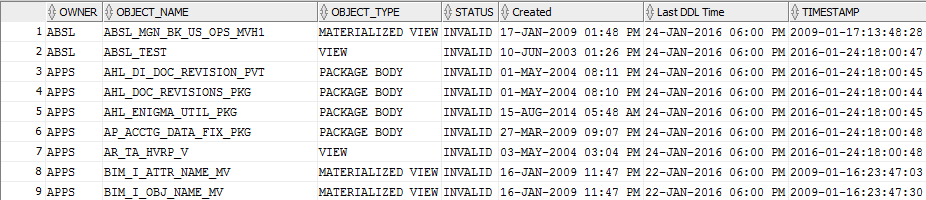
Invalid objects details in oracle database
Below script to know the invalid objects count and details including (creation date, modification date and user details).
Script:
Script:
set linesize 200 column owner format a12 col columnname format a20 column object_name format a30 column object_type format a15 column "Created" format a21 column "Last DDL Time" format a21 select owner, object_name, object_type, status, to_char(created, 'DD-MON-YYYY HH:MI AM') "Created", to_char(last_ddl_time, 'DD-MON-YYYY HH:MI AM') "Last DDL Time" , timestamp from dba_objects where status = 'INVALID' order by owner, object_name;
Output:
Monday, 25 January 2016
Current running concurrent request details in oracle apps R12
Below script to know the current running concurrent request details in oracle apps R12.
Script:
set echo off pages 100 lines 202
column REQUEST heading 'Request' format a9
column PHASE heading 'Phase' format A8
column STATUS heading 'Status' format A8
column PROGRAM heading 'Program Name' format A40
column SHORT heading 'Short Name' format A15
column REQUESTOR heading 'Requestor' format A15
column START_TIME heading 'Start Time' format A15
column RUN_TIME justify left heading 'Time(m)' format 999999.9
column OSPID heading 'OSPID' format a5
column OS_PIDa heading 'OSPIDA' format a6
column SID heading 'SID' format 99999
column serial# heading 'Serial#' format 99999
column sidser heading 'SidSer#' format a10
select substr(fcrv.request_id,1,9)REQUEST,
decode(fcrv.phase_code,'P','Pending','R','Running','I','Inactive','Completed')PHASE,
decode(fcrv.status_code,
'A','Waiting',
'B','Resuming',
'C','Normal',
'F','Scheduled',
'G','Warning',
'H','On Hold',
'I','Normal',
'M','No Manager',
'Q','Standby',
'R','Normal',
'S','Suspended',
'T','Terminating',
'U','Disabled',
'W','Paused',
'X','Terminated',
'Z','Waiting',fcrv.status_code)STATUS,
substr(fcrv.program,1,40)PROGRAM,
substr(fcrv.PROGRAM_SHORT_NAME,1,15)SHORT,
substr(fcrv.requestor,1,15)REQUESTOR,
-- to_char(fcrv.actual_start_date,'MM/DD/RR HH24:MI')START_TIME,
round(((sysdate - fcrv.actual_start_date)*1440),1)RUN_TIME,
substr(fcr.oracle_process_id,1,7)OSPID,
s.sid||','||s.serial# sidser
-- substr(fcr.os_process_id,1,7)OS_PIDa
from apps.fnd_conc_req_summary_v fcrv,
apps.fnd_concurrent_requests fcr,
v$session s,
v$process p
where fcrv.phase_code = 'R'
and fcrv.request_id = fcr.request_id
and s.paddr(+) = p.addr
and fcr.oracle_process_id = p.spid(+)
and fcrv.concurrent_program_id not in ('40112','40113','36887')
--and trunc(fcrv.actual_start_date) like trunc(sysdate)
order by PHASE, STATUS,REQUEST desc
/
Output:
Script:
set echo off pages 100 lines 202
column REQUEST heading 'Request' format a9
column PHASE heading 'Phase' format A8
column STATUS heading 'Status' format A8
column PROGRAM heading 'Program Name' format A40
column SHORT heading 'Short Name' format A15
column REQUESTOR heading 'Requestor' format A15
column START_TIME heading 'Start Time' format A15
column RUN_TIME justify left heading 'Time(m)' format 999999.9
column OSPID heading 'OSPID' format a5
column OS_PIDa heading 'OSPIDA' format a6
column SID heading 'SID' format 99999
column serial# heading 'Serial#' format 99999
column sidser heading 'SidSer#' format a10
select substr(fcrv.request_id,1,9)REQUEST,
decode(fcrv.phase_code,'P','Pending','R','Running','I','Inactive','Completed')PHASE,
decode(fcrv.status_code,
'A','Waiting',
'B','Resuming',
'C','Normal',
'F','Scheduled',
'G','Warning',
'H','On Hold',
'I','Normal',
'M','No Manager',
'Q','Standby',
'R','Normal',
'S','Suspended',
'T','Terminating',
'U','Disabled',
'W','Paused',
'X','Terminated',
'Z','Waiting',fcrv.status_code)STATUS,
substr(fcrv.program,1,40)PROGRAM,
substr(fcrv.PROGRAM_SHORT_NAME,1,15)SHORT,
substr(fcrv.requestor,1,15)REQUESTOR,
-- to_char(fcrv.actual_start_date,'MM/DD/RR HH24:MI')START_TIME,
round(((sysdate - fcrv.actual_start_date)*1440),1)RUN_TIME,
substr(fcr.oracle_process_id,1,7)OSPID,
s.sid||','||s.serial# sidser
-- substr(fcr.os_process_id,1,7)OS_PIDa
from apps.fnd_conc_req_summary_v fcrv,
apps.fnd_concurrent_requests fcr,
v$session s,
v$process p
where fcrv.phase_code = 'R'
and fcrv.request_id = fcr.request_id
and s.paddr(+) = p.addr
and fcr.oracle_process_id = p.spid(+)
and fcrv.concurrent_program_id not in ('40112','40113','36887')
--and trunc(fcrv.actual_start_date) like trunc(sysdate)
order by PHASE, STATUS,REQUEST desc
/
Output:
Forgotten SYSADMIN password in oracle apps R12
Step 1: Connect to apps user in application node
SQL> conn apps/APPS123;
Connected.
Step 2: Create below package
SQL> CREATE OR REPLACE PACKAGE XXX_GET_PWD AS
FUNCTION decrypt (KEY IN VARCHAR2, VALUE IN VARCHAR2)
RETURN VARCHAR2;
END XXX_GET_PWD;
/
Step 3: Create below package body
SQL> CREATE OR REPLACE PACKAGE BODY XXX_GET_PWD AS
FUNCTION decrypt (KEY IN VARCHAR2, VALUE IN VARCHAR2)
RETURN VARCHAR2 AS
LANGUAGE JAVA NAME 'oracle.apps.fnd.security.WebSessionManagerProc.decrypt
(java.lang.String,java.lang.String) return java.lang.String';
END XXX_GET_PWD;
/
Step 4: Run the below script
SELECT Usr.User_Name,
Usr.Description,
XXX_GET_PWD.Decrypt (
(SELECT (SELECT XXX_GET_PWD.Decrypt (
Fnd_Web_Sec.Get_Guest_Username_Pwd,
Usertable.Encrypted_Foundation_Password)
FROM DUAL)
AS Apps_Password
FROM applsys.Fnd_User Usertable
WHERE Usertable.User_Name =
(SELECT SUBSTR (
Fnd_Web_Sec.Get_Guest_Username_Pwd,
1,
INSTR (Fnd_Web_Sec.Get_Guest_Username_Pwd,
'/')
- 1)
FROM DUAL)),
Usr.Encrypted_User_Password)
Password
FROM applsys.Fnd_User Usr
WHERE Usr.User_Name = '&User_Name';
(Note:Enter the SYSADMIN user name in CAPS)
Step 5: Validate the SYSADMIN password is working fine or not.
SQL> select fnd_web_sec.validate_login('SYSADMIN','sysadmin') from dual;
FND_WEB_SEC.VALIDATE_LOGIN('SYSADMIN','SYSADMIN')
--------------------------------------------------------------------------------
Y
(Note: In my case Username is "SYSADMIN" and password is "sysadmin")
Hope this post will helps you :)
SQL> conn apps/APPS123;
Connected.
Step 2: Create below package
SQL> CREATE OR REPLACE PACKAGE XXX_GET_PWD AS
FUNCTION decrypt (KEY IN VARCHAR2, VALUE IN VARCHAR2)
RETURN VARCHAR2;
END XXX_GET_PWD;
/
Step 3: Create below package body
SQL> CREATE OR REPLACE PACKAGE BODY XXX_GET_PWD AS
FUNCTION decrypt (KEY IN VARCHAR2, VALUE IN VARCHAR2)
RETURN VARCHAR2 AS
LANGUAGE JAVA NAME 'oracle.apps.fnd.security.WebSessionManagerProc.decrypt
(java.lang.String,java.lang.String) return java.lang.String';
END XXX_GET_PWD;
/
Step 4: Run the below script
SELECT Usr.User_Name,
Usr.Description,
XXX_GET_PWD.Decrypt (
(SELECT (SELECT XXX_GET_PWD.Decrypt (
Fnd_Web_Sec.Get_Guest_Username_Pwd,
Usertable.Encrypted_Foundation_Password)
FROM DUAL)
AS Apps_Password
FROM applsys.Fnd_User Usertable
WHERE Usertable.User_Name =
(SELECT SUBSTR (
Fnd_Web_Sec.Get_Guest_Username_Pwd,
1,
INSTR (Fnd_Web_Sec.Get_Guest_Username_Pwd,
'/')
- 1)
FROM DUAL)),
Usr.Encrypted_User_Password)
Password
FROM applsys.Fnd_User Usr
WHERE Usr.User_Name = '&User_Name';
(Note:Enter the SYSADMIN user name in CAPS)
Step 5: Validate the SYSADMIN password is working fine or not.
SQL> select fnd_web_sec.validate_login('SYSADMIN','sysadmin') from dual;
FND_WEB_SEC.VALIDATE_LOGIN('SYSADMIN','SYSADMIN')
--------------------------------------------------------------------------------
Y
(Note: In my case Username is "SYSADMIN" and password is "sysadmin")
Hope this post will helps you :)
Sunday, 24 January 2016
Forgotten apps user password in oracle apps R12
Below steps to get the forgotten apps user password in oracle apps R12.
Step 1: Connect to sys user
SQL> show user
USER is "SYS"
Step 2: Create function to know the encrypted password
SQL> create FUNCTION apps.decrypt_pin_func(in_chr_key IN VARCHAR2,in_chr_encrypted_pin IN VARCHAR2) RETURN VARCHAR2 AS LANGUAGE JAVA NAME 'oracle.apps.fnd.security.WebSessionManagerProc.decrypt(java.lang.String,java.lang.String) return java.lang.String';
/
Function created.
Step 3: Query for password
SQL> set linesize 200 long 300
SQL> select ENCRYPTED_FOUNDATION_PASSWORD from apps.fnd_user where USER_NAME='GUEST';
ENCRYPTED_FOUNDATION_PASSWORD
----------------------------------------------------------------------------------------------------
ZGC679A64D8394F23E12CA4EB288F264FC09EBC9144C06181E921F88A972E231E9B530E7810DE42AC6103FC3CCD317CA3391
Step 4: Apps password using encrypted guest password
SQL> SELECT apps.decrypt_pin_func('GUEST/ORACLE','ZGC679A64D8394F23E12CA4EB288F264FC09EBC9144C06181E921F88A972E231E9B530E7810DE42AC6103FC3CCD317CA3391') from dual;
APPS.DECRYPT_PIN_FUNC('GUEST/ORACLE','ZGC679A64D8394F23E12CA4EB288F264FC09EBC9144C06181E921F88A972E231E9B530E7810DE42AC6103FC3CCD317CA3391')
---------------------------------------------------------------------------------------------------------------------------------------------
APPS
Step 5: Test the password is working fine or not
SQL> conn apps/APPS123;
Connected.
Hope this post will helps you :)
Step 1: Connect to sys user
SQL> show user
USER is "SYS"
Step 2: Create function to know the encrypted password
SQL> create FUNCTION apps.decrypt_pin_func(in_chr_key IN VARCHAR2,in_chr_encrypted_pin IN VARCHAR2) RETURN VARCHAR2 AS LANGUAGE JAVA NAME 'oracle.apps.fnd.security.WebSessionManagerProc.decrypt(java.lang.String,java.lang.String) return java.lang.String';
/
Function created.
Step 3: Query for password
SQL> set linesize 200 long 300
SQL> select ENCRYPTED_FOUNDATION_PASSWORD from apps.fnd_user where USER_NAME='GUEST';
ENCRYPTED_FOUNDATION_PASSWORD
----------------------------------------------------------------------------------------------------
ZGC679A64D8394F23E12CA4EB288F264FC09EBC9144C06181E921F88A972E231E9B530E7810DE42AC6103FC3CCD317CA3391
Step 4: Apps password using encrypted guest password
SQL> SELECT apps.decrypt_pin_func('GUEST/ORACLE','ZGC679A64D8394F23E12CA4EB288F264FC09EBC9144C06181E921F88A972E231E9B530E7810DE42AC6103FC3CCD317CA3391') from dual;
APPS.DECRYPT_PIN_FUNC('GUEST/ORACLE','ZGC679A64D8394F23E12CA4EB288F264FC09EBC9144C06181E921F88A972E231E9B530E7810DE42AC6103FC3CCD317CA3391')
---------------------------------------------------------------------------------------------------------------------------------------------
APPS
Step 5: Test the password is working fine or not
SQL> conn apps/APPS123;
Connected.
Hope this post will helps you :)
Sunday, 10 January 2016
Script for RMAN restore current status
Below script to know RMAN restore current status and remaining time to complete the refresh.
Script:
set lines 199
select OPNAME,SOFAR/TOTALWORK*100 PCT, trunc(TIME_REMAINING/60) MIN_RESTANTES,
trunc(ELAPSED_SECONDS/60) MIN_ATEAGORA
from v$session_longops where TOTALWORK>0 and OPNAME like '%RMAN%';
Output:
How to disable all scheduled concurrent programs after refresh
Below script to disable scheduled concurrent programs after refresh.
Script:
update fnd_concurrent_requests
set phase_code='C',
status_code='D'
where phase_code = 'P'
and (status_code = 'I' OR status_code = 'Q');
and requested_start_date >= SYSDATE
and hold_flag = 'N';
Script:
update fnd_concurrent_requests
set phase_code='C',
status_code='D'
where phase_code = 'P'
and (status_code = 'I' OR status_code = 'Q');
and requested_start_date >= SYSDATE
and hold_flag = 'N';
Apache, Jserv, Forms, Jinitiator and Perl version in Oracle Ebiz R12
Below script to know the versions of Apache, Jserv, Forms, Jinitiator and Perl version in Oracle Ebiz R12.
Apache Version:
-bash-3.2$ $IAS_ORACLE_HOME/Apache/Apache/bin/httpd -v
Server version: Oracle-Application-Server-10g/10.1.3.5.0 Oracle-HTTP-Server
Server built: Aug 1 2009 07:55:39
Apache Version:
-bash-3.2$ $IAS_ORACLE_HOME/Apache/Apache/bin/httpd -v
Server version: Oracle-Application-Server-10g/10.1.3.5.0 Oracle-HTTP-Server
Server built: Aug 1 2009 07:55:39
(Note : Red color is script and below is the output)
Java Version:
-bash-3.2$ sh -c "`awk -F= '$1 ~ /^JSERVJAVA.*$/ {print $2}' $ADMIN_SCRIPTS_HOME/java.sh` -version;"
java version "1.6.0_71"
Java(TM) SE Runtime Environment (build 1.6.0_71-b31)
Java HotSpot(TM) Server VM (build 20.71-b01, mixed mode)
JRE Version:
-bash-3.2$ cat $FORMS_WEB_CONFIG_FILE|grep sun_plugin_version| cut -c 1-35
sun_plugin_version=1.6.0_38
Forms Version:
-bash-3.2$ $ORACLE_HOME/bin/frmcmp_batch|grep Forms| grep Version
Forms 10.1 (Form Compiler) Version 10.1.2.3.0 (Production)
PL/SQL Version:
-bash-3.2$ $ORACLE_HOME/bin/frmcmp_batch|grep PL/SQL|grep Version
PL/SQL Version 10.1.0.5.0 (Production)
Perl Version:
-bash-3.2$ $IAS_ORACLE_HOME/perl/bin/perl -v|grep built
This is perl, v5.8.3 built for sun4-solaris-thread-multi
AD Jobs running more than 1 hour
Below script to know AD jobs running more than 1 hour.
Script:
select distinct t.job_name,
TRUNC(t.ELAPSED_TIME * 24 * 60) MINUTES,
t.PROGRAM_RUN_ID,
t.product,
t.start_time,
t.end_time
from applsys.AD_PROGRAM_RUN_TASK_JOBS t
WHERE PROGRAM_RUN_ID in
(select program_run_id
from AD_PATCH_RUNS
where patch_top like '/application_r12/apps/apps_st/appl/au/12.0.0/patch/115/driver')
AND TRUNC(t.ELAPSED_TIME * 24 * 60) > 60
ORDER BY 2 desc;
Script:
select distinct t.job_name,
TRUNC(t.ELAPSED_TIME * 24 * 60) MINUTES,
t.PROGRAM_RUN_ID,
t.product,
t.start_time,
t.end_time
from applsys.AD_PROGRAM_RUN_TASK_JOBS t
WHERE PROGRAM_RUN_ID in
(select program_run_id
from AD_PATCH_RUNS
where patch_top like '/application_r12/apps/apps_st/appl/au/12.0.0/patch/115/driver')
AND TRUNC(t.ELAPSED_TIME * 24 * 60) > 60
ORDER BY 2 desc;
How to check Gather schema stats run in last 30 days
How many times GSS run in last 30 days in oracle.
Script:
set linesize 200
select r.request_id,r.actual_start_date,r.phase_code,r.status_code,r.actual_completion_date,argument_text from
apps.fnd_concurrent_programs_vl p, apps.fnd_concurrent_requests r
where p.concurrent_program_id = r.concurrent_program_id
and p.application_id = r.program_application_id
and p.user_concurrent_program_name like '%Gather Schema Statistics%'
and r.actual_start_date >= sysdate-30 order by r.requested_start_date;
Note: Run this query in Toad (or) sql developer for clear data.
Output:
Script:
set linesize 200
select r.request_id,r.actual_start_date,r.phase_code,r.status_code,r.actual_completion_date,argument_text from
apps.fnd_concurrent_programs_vl p, apps.fnd_concurrent_requests r
where p.concurrent_program_id = r.concurrent_program_id
and p.application_id = r.program_application_id
and p.user_concurrent_program_name like '%Gather Schema Statistics%'
and r.actual_start_date >= sysdate-30 order by r.requested_start_date;
Note: Run this query in Toad (or) sql developer for clear data.
Output:
Subscribe to:
Posts (Atom)