Wednesday, 30 March 2016

ADOP (Online Patching) Interview question in oracle apps R12.2

1.What is ADOP concept in oracle apps?
Online patching is the most important new feature in Oracle E-Business Suite Release 12.2. It is the ability to patch a running system without having to take the system down for a significant period of time while the patches are applied.

'adop' is the utility we use to apply patches in R12.2

2.What is PATCH_TOP directory in R12.2?
In R12.2 there is a new directory location environment variable called $PATCH_TOP which points to $NE_BASE/EBSapps/patch
$NE_BASE points to <Non-Editioned-filesystem-directory>

Download the patch into the patch top directory and unzip it. This is the default location where the adop will look for patch files.
If you are planning to put patches in non-defualt location then you need to use adop parameter 'patchtop=<patch_path>' to explicitly define this location.

3.What happens when ADOP command is run?
adop will perform all the tasks required to apply the patch:
*  Reads patch metadata to determine patch dependencies and requirements.
* Attempt to recover previously failed patching session (if any).
* Reads and validate the patch/product driver files.
* Compares version numbers of existing files against the patch files and Backs up all existing files        that will be changed by the patch.
* Copies files.
* Archive files in libraries.
* Relinks executables, Generates forms, reports, messages, graphics, and Java archive (JAR) files.
* Compiles JSP files and invalid database objects. Updates database objects.
* Runs AutoConfig if required.
* Saves patch information to the database.

All tasks are similar to what adpatch utility used to do earlier.

4.In which file system ADOP command should be run?
We always run adop utility from the run edition file system.

5. How to apply patch in hot patch mode in R12.2?
During apply mode use the below command.
adop phase=apply options=hotpatch

6.How to run all pahses in single ADOP command in R12.2?
adop phase=prepare,apply,finalize,cutover,cleanup patches=<patch_number1>,<patch_number2>

Note: All the phases need to be completed and you can’t skip any of these. For example, if you try to skip prepare phase, you may get error message like "Apply phase can only be run while in a patching cycle, i.e. after prepare phase."

7.How to complete ADOP patching cycle activity in Interactive mode?
We must set the environment by executing the run file system environment file.
$ . ./ <run APPL_TOP path>/APPS<CONTEXT_NAME>.env

* adop phase=prepare
* adop phase=apply patches=<patch_number1>,<patch_number2> workers=<number_of_worker>
* adop phase=finalize workers=<number_of_worker> (called automatically)
* adop phase=cutover workers=<number_of_worker>
* adop phase=cleanup (called automatically)

8.How to complete ADOP patching cycle activity in Non-Interactive mode?
During apply phase, Non-interactive patching is a way to save time by avoiding some of the prompts and automating the patching process.

You can apply patches in non-interactive way by using a defaults file that contains much of the information you would have supplied at the adop prompts and by creating another file known as input file. Then, when you run adop, you specify the name of the input file. The location of the defaults file will also need to be included in the input file.

$ adop phase=apply input_file=<input_file.txt>

Location of Default file on both the run APPL_TOP and patch APPL_TOP is: $APPL_TOP/admin/<SID>_patch/adalldefaults.txt

Just in case this file gets corrupted or lost, you can run AutoConfig and it will automatically instantiate a new copy.

The input_file contents should include the following required parameters:
adop phase=apply patches=<patch number>
adop phase=apply workers=<number of workers>
adop phase=apply patchtop=<directory where patches are staged>
adop phase=apply defaultsfile=<defaults file on patch APPL TOP>

Note: In R12.2, you don’t need to create this defaults file. The file is already created by oracle process. However you need to create one ‘input file’ to use with adop (The defaults file is not specified on the adop command line. It is the input file.)

9.How to skip specific patching portion/action in oracle apps R12.2?

During apply phase:

adop phase=apply options=nodatabaseportion, nogenerateportion.

adop phase=apply options=noactiondetails - if you do not want the details to be printed.

adop phase=apply options=noautoconfig - if you are applying a number of patches in sequence and want to run AutoConfig only once in the end.

adop phase=apply option=nocheckfile – To turn off the checkfile feature. Using checkfile adop skip some actions which are already done.

adop phase=apply option=nocompiledb - when applying multiple NLS, documentations patches etc.

adop phase=apply option=nocompilejsp - when applying multiple NLS, documentations patches etc.

adop phase=apply option=nocopyportion - For skipping copy portion of the patch.
Tuesday, 29 March 2016

Interview questions related to patching in oracle apps

1.What is a one-off patch?
An one-off patch is a small patch (of without any pre-requisites) to fix a bug.

2.What is a mini pack?
A mini pack is one which will upgrade any product patchset level to next level (like AD.H to AD.I).

3.What is Family pack?
A Family pack is one which will upgrade the patchset level of all the products in that family to particular patchset level.

4.What is Maintenance pack?
A maintenance pack will upgrade applications from one version to another (like 11.5.8 to 11.5.9).

5 What is a Rollup patch?
A rollup patch is one which will deliver bug fixes identified after the release of any major application versions (like 11.5.10.2/12.1.0).

6.What is consolidated patch?
Consolidated patches will come into picture after upgrades from one version of applications to another, all post upgrade patches will a consolidated and given as consolidated patch.

7.How you apply a patch?
adpatch

8.How to find latest patchset level for module installed?
select APP_SHORT_NAME, max(PATCH_LEVEL) from AD_PATCH_DRIVER_MINIPKS GROUP BY APP_SHORT_NAME;

9.How you will find whether a patch is applied/not?
Query ad_bugs.

10.What is the other table where you can query what are the patches applied?
Ad_applied_patches.

11.How to find out which patch driver is applied (like c,d,g or u)?
ad_patch_drivers.

12.How to find out whether a language patch is applied for a particular patch?
Query ad_patch_driver_langs.

13.What is the difference between ad_bugs and ad_applied_patches?
A patch can deliver solution for more than one bug, so ad_applied_patches may not give the perfect information as in case of ad_bugs.

14.What inputs you need to apply a patch other than driver name and etc?
apps and system passwords

15.What are the tables adpatch will create and when?
Adpatch will create FND_INSTALL_PROCESSES and AD_DEFERRED_JOBS table when it will apply d,g and u drivers.

16.What is a patch and name some different types of patches?
Patch is a program which fixes the bug.

There are 4 different types of patches

One-off patch:
This is the simplest type of patch. It is created to resolve a particular problem.

Mini pack Patch:
It is a collection of one-off patches related to a particular module or product.
Mini Pack version of module is denoted by Alphabetic characters.

Family pack patch:
This is a collection of mini pack patches in one family.
Alphabetic characters denote the family pack version.

Maintenance pack patch:
This is a collection of family pack patches.
Oracle Applications Release 11.5.10 is an example of Maintenance pack.
rollup patches,
consolidated patches.

17.What are the contents of patch and drivers present in patching?
Contents of patch:
• Readme files
• Driver files
• Metadata files
• Replacement files

Drivers present in patching:
• C (copy) driver - It copies all the files and links the executables.
• D (database) driver - It is responsible for running SQL scripts which updates the database.
• G (generate) driver - It is responsible for generating forms, reports and message files.
• U (unified) driver - It is a united driver containing all copy and database actions.
(In 12.1 we have only 'u' drive file)

18.What do you do if patch fails?
• Evaluate log files to determine the cause of the error.
• Repair the cause of error.
• Now restart adpatch.
• Answer 'Yes' when adpatch asks if you want to continue the previous session.
• Adpatch starts from where it left off by skipping all completed steps.

19.How can I determine the effects a patch will have on my application system?
This can be done by patch wizard in the Oracle Applications manager.
• Checking total number of files in the patch and which are installed.
• Products that contain updated files.
• Total number of files introduced by the patch.
• Files on the target system changed by the patch.
• Files which depend on patched files.

20.How can you reduce the downtime when you have to apply multiple patches?
• You can reduce the downtime by merging all the patches into one single patch using admergepatch (admrgpch) tool.
• You can also apply multiple patches one by one by choosing options nocompiledb, nocompilejsp, and nolink.
• Compilation of invalid objects, jsp’s and relinking can be skipped till the last patch is applied.
• In the last patch you can compile all of them and then relink.
• You can also choose the max number of workers which your CPU permits.

21.List out the Log Files created on running patch?
Running the patch creates the following log files
• Adpatch.log: Information about the patch run will be stored here.
• Adpatch.lgi: It contains information which has been discarded by adpatch.log. For example, the files which has not been copied by the adpatch.
• Adrelink.log: Relinking information performed by patch will be stored here.
• Adworkxx.log: Workers log details will be stored here.

22.Is it possible to revert the patch application? Explain in detail how?
• Yes, it’s possible to revert the patching but not 100% sure.
• In test environment it’s always recommended to take the full backup of the database, apply the patch and revert from backup.
• Adpatch is responsible for copying the files from the patch.
• From the patch log, drop the database objects created by the patch.
• Similarly forms in the G driver should be replaced from the backup taken by adpatch and should be manually generated.

23. What is unified driver (U driver) and what does it do?
• Unified driver is a combination of C,D, & G drivers.
• U driver is also named as u<patch_number>.drv
• It requires only a single execution of AutoPatch.

24.I am applying a patch, can I open another session and run adadmin?
Yes, unless you are running a process where workers are involved.

25.I am applying a patch, can I open another session in another node and run adpatch?
No

26.How to find out if any patch except localization patch is applied or not, if applied, that what all drivers it contain and time of it's application?
select A.APPLIED_PATCH_ID, A.PATCH_NAME, A.PATCH_TYPE, B.PATCH_DRVIER_ID, B.DRIVER_FILE_NAME, B.ORIG_PATCH_NAME, B.CREATION_DATE, B.PLATFORM, B.SOURCE_CODE, B.CREATIONG_DATE, B.FILE_SIZE, B.MERGED_DRIVER_FLAG, B.MERGE_DATE from AD_APPLIED_PATCHES A, AD_PATCH_DRIVERS B where A.APPLIED_PATCH_ID = B.APPLIED_PATCH_ID and A.PATCH_NAME = '%';

27.How to know that if the patch is applied successfully, applied on both node or not?
select D.PATCH_NAME, B.APPLICATIONS_SYSTEM_NAME, B.INSTANCE_NAME, B.NAME, C.DRIVER_FILE_NAME, A.PATCH_DRIVER_ID, A.PATCH_RUN_ID, A.SESSION_ID, A.PATCH_TOP, A.START_DATE, A.END_DATE, A.SUCCESS_FLAG, A.FAILURE_COMMENTS from AD_PATCH_RUNS A, AD_APPL_TOPS B, AD_PATCH_DRVIERS C, AD_APPLIED_PATCHES D where A.APPL_TOP_ID = B.APPL_TOP_ID AND A.PATCH_DRIVER_ID = C.PATCH_DRIVER_ID and C.APPLIED_PATCH_ID = D.APPLIED_PATCH_ID and A.PATCH_DRIVER_ID in (select PATCH_DRIVER_ID from AD_PATCH_DRIVERS where APPLIED_PATCH_ID in (select APPLIED_PATCH_ID from AD_APPLIED_PATCHES where PATCH_NAME = '')) ORDER BY 3;

28.How to get information related to how many times driver file is applied for bugs?
select * from AD_PATCH_RUN_BUGS where BUG_ID in (select BUG_ID from AD_BUGS where BUG_NUMBER = '';

29.How to find what is being done by the patch?
select A.BUG_NUMBER "Patch Number", B. PATCh_RUN_BUG_ID "Run ID",D.APP_SHORT_NAME appl_top, D.SUBDIR, D.FILENAME, max(F.VERSION) latest, E.ACTION_CODE action from AD_BUGS A, AD_PATCH_RUN_BUGS B, AD_PATCH_RUN_BUG_ACTIONS C, AD_FILES D, AD_PATCH_COMMON_ACTIONS E, AD_FILE_VERSIONS F where A.BUG_ID = B.BUG_ID and B.PATCH_RUN_BUG_ID = C.PATCH_RUN_BUG_ID and C.FILE_ID = D.FILE_ID and E.COMMON_ACTION_ID = C.COMMON_ACTION_ID and D.FILE_ID = F.FILE_ID and A.BUG_NUMBER = '' and B.PATCH_RUN_BUG_ID = ' < > ' and C.EXECUTED_FLAG = 'Y' GROUP BY A.BUG_NUMBER, B.PATCH_RUN_BUG_ID, D. APP_SHORT_NAME, D>SUBDIR, D.FILENAME, E.ACTION_CODE;

30.How to find merged patch information from database in Oracle Applications?
select bug_number from ad_bugs where bug_id in ( select bug_id from ad_comprising_patches where patch_driver_id =(select patch_driver_id from ad_patch_drivers where applied_patch_id =&n) );

31.How to know, what all has been done during application of PATCH?
Select J.PATCH_NAME, H.APPLICATIONS_SYSTEM_NAME Instance_Name, H.NAME, I.DRIVER_FILE_NAME, D.APP_SHORT_NAME appl_top, D.SUBDIR, D.FILENAME, max(F.VERSION) latest, E.ACTION_CODE action from AD_BUGS A, AD_PATCH_RUN_BUGS B,AD_PATCH_RUN_BUG_ACTIONS C, AD_FILES D, AD_PATCH_COMMON_ACTIONS E, AD_FILE_VERSIONS F, AD_PATCH_RUNS G, AD_APPL_TOPS H, AD_PATCH_DRIVERS I, AD_APPLIED_PATCHES J where A.BUG_ID = B.BUG_ID and
B.PATCH_RUN_BUG_ID = C.PATCH_RUN_BUG_ID and C.FILE_ID = D.FILE_ID and E.COMMON_ACTION_ID = C.COMMON_ACTION_ID
and D.FILE_ID = F.FILE_ID and G.APPL_TOP_ID = H.APPL_TOP_ID and G.PATCH_DRIVER_ID = I.PATCH_DRIVER_ID and
I.APPLIED_PATCH_ID = J.APPLIED_PATCH_ID and B.PATCH_RUN_ID = G.PATCH_RUN_ID and C.EXECUTED_FLAG = 'Y' and
G.PATCH_DRIVER_ID in (select PATCH_DRIVER_ID from AD_PATCH_DRIVERS where APPLIED_PATCH_ID
in (select APPLIED_PATCH_ID from AD_APPLIED_PATCHES where PATCH_NAME = 'merged'))
GROUP BY J.PATCH_NAME, H.APPLICATIONS_SYSTEM_NAME, H.NAME, I.DRIVER_FILE_NAME, D.APP_SHORT_NAME, D.SUBDIR,
D.FILENAME, E.ACTION_CODE;

32.What is the significance of FND_INSTALL_PROCESSES and AD_DEFERRED_JOBS table?

FND_INSTALL_PROCESSES table will store the worker information like what job is assigned to which worker and its status.

AD_DEFERRED_JOBS will come into picture when some worker is failed, it will be moved to AD_DEFERRED_JOBS table, from where again adpatch will take that job and try to resign, after doing this 3 times if still that worker is failing, then adpatch will stop patching and throw the error that particular worker has failed. We need to troubleshoot and restart the worker.

33.While applying an application patch is that necessary that database and listener should be up?
Yes. Because adpatch will connect to database and update so many tables etc…

34.While applying a patch if that patch is failing because of a pre-req then how you will apply that pre-req patch and resume with the current patch?
We need to take the backup of FND_INSTALL_PROCESSES and AD_DEFERRED_JOBS tables and restart directory at APPL_TOP/admin/SID and then use adctrl to quit all the workers. Then apply the pre-req patch, after that rename restart directory to its original name and create FND_INSTALL_PROCESSES and AD_DEFERRED_JOBS tables from the backup tables. Start adpatch session and take the options want to continue previous session.

35.How adpatch knows what are the pre-req’s for the patch which it is applying?
Every patch a file called b.ldt file will be delivered which contain the pre-req information. adpatch load this into database using FNDLOAD and check, whether those pre-req patches were applied or not.

36.How adpatch will know the file versions of the patch delivered files?
Eeach patch a file with name f.ldt is delivered, which contain the file versions of the files delivered with the patch. adpatch will use this file to compare the file versions of files its delivering with the file on file system.

37.What is the adpatch log file location?
APPL_TOP/admin/SID/log

38.How you will know what are the files the patch is going to change just my unzipping the patch?
When we unzip a patch it will keep all the files related to a particular product under that directory inside u r patch directory for example if the patch delivering files related to FND product then it will create a sub directory under the patch directory with the name FND in which it will put all related files to that product

39.What is the significance of backup directory under patch directory?
When we apply a patch it will keep the copy of the files which it’s going to change in file system.

40.What are the different modes you can run your adpatch?
1.Interactive – default mode
2.Non interactive – Use defaults files to store prompt values (adpatch defaultsfile= interactive=no)
3.Test – Without actually applying a patch just to check what doing. (adpatch apply=no)
4.Pre-install – (adpatch preinstall=y)
This mode will be useful to decrease upgrade downtime as its applies bus fixes without running SQL, EXEC and generate portion of patch.

41.How to skip copy portion while applying a patch?
Adpatch options=nocopyportion

42.How to find opatch is enabled or not for u r database?
If Opatch directory exists under RDBMS_ORACLE_HOME.

43.How to find out what are the rdbms patches applied to an oracle home?
1. opatch lsinventory
2. $RDBMS_ORACLE_HOME/.patch_storage directory contains the directories with the rdbms patch numbers, which are applied to this oracle home.

44.Is that necessary to enable maintenance mode while applying a patch?
We can even apply a patch without enabling maintenance mode with the following option
adpatch options=hotpatch

45.While applying a rdbms patch using opatch you are getting the error, unable to read inventory/inventory is corrupted/ORACLE_HOME is not registered, what you will do, and how you will apply the patch?
We will check the inventory directory permission, try to apply the patch after giving 777 permissions to that inventory directory. If still it won’t work we will apply patch with the following command:
opatch apply no_inventory.

Monday, 21 March 2016

SYSADMIN Responsibility is not showing after instance refresh

We are unable to see the SYSADMIN responsibilities after instance refresh. We followed the below steps to resolve this issue.

Updating wf_local_user_roles and wf_USER_ROLE_ASSIGNMENTS resolves this issue.

Step 1:

SQL> select effective_end_date from wf_local_user_roles where user_name = 'SYSADMIN';

EFFECTIVE_END_D
--------------------------
01-JAN-99
01-JAN-99

222 rows selected.

Step 2:

SQL> select TO_CHAR(effective_end_date, 'dd-mon-yyyy') from wf_local_user_roles where user_name = 'SYSADMIN';

TO_CHAR(EFFECTIVE_END_DATE,'DD-MO
-----------------------------------------------------------
01-jan-99
01-jan-99

222 rows selected.

Step 3:

SQL> select TO_CHAR(effective_end_date, 'dd-mon-yyyy') from wf_USER_ROLE_ASSIGNMENTS where user_name = 'SYSADMIN';

TO_CHAR(EFFECTIVE_END_DATE,'DD-MO
-----------------------------------------------------------
01-jan-99
01-jan-99
01-jan-99

243 rows selected.

Step 4:

SQL> create table wf_user_role_assignments_bkp as select * from wf_user_role_assignments;

Table created.

SQL> create table wf_local_user_Roles_mar as select * from wf_local_user_Roles;

Table created.

Step 5:

SQL> update wf_user_role_assignments
 set user_end_date=null,
 role_end_date=null,
 assigning_Role_end_Date=null,
 effective_end_Date=to_date('31-12-9999','dd-mm-yyyy')
 where user_name=upper('&username');
Enter value for username: SYSADMIN
old   6:  where user_name=upper('&username')
new   6:  where user_name=upper('SYSADMIN')

243 rows updated.

Step 6:

SQL> update wf_local_user_Roles
 set user_end_date=null,
 role_end_date=null,
 effective_end_Date=to_date('31-12-9999','dd-mm-yyyy')
 where user_name=upper('&username');
Enter value for username: SYSADMIN
old   5:  where user_name=upper('&username')
new   5:  where user_name=upper('SYSADMIN')

222 rows updated.

SQL> commit;

Commit complete.

Step 7:

SQL> select TO_CHAR(effective_end_date, 'dd-mon-yyyy') from wf_USER_ROLE_ASSIGNMENTS where user_name = 'SYSADMIN';

TO_CHAR(EFFECTIVE
-------------------------------
31-dec-9999
31-dec-9999
31-dec-9999
31-dec-9999

243 rows selected.

SQL> select effective_end_date from wf_local_user_roles where user_name = 'SYSADMIN';

EFFECTIVE_END_D
----------------------------
30-NOV-15
30-NOV-15
30-NOV-15

222 rows selected.

SQL> commit;

Commit complete.

Now, we are able to access all the SYSADMIN the responsibility.

Tuesday, 15 March 2016

ADOP phase=prepare is failing at adconfig on the adgenjky.sh script while upgrade

Issue:

While trying to apply E-Business Suite 12.2.3 Release Update Pack, the ADOP phase=prepare is failing at adconfig and adconfig is failing at adgenjky.sh script.

[SETUP PHASE]
 AutoConfig could not successfully execute the following scripts:
Directory: /data01/apps/fs2/inst/apps/TEST/admin/install
adgenjky.sh INSTE8_SETUP 1

AutoConfig is exiting with status 1

Fix:

1. Please run the following from the SQL as apps user and it will return the passwords we will use to run the command manually:

set serveroutput on
declare
spass varchar2(30);
kpass varchar2(30);
begin
ad_jar.get_jripasswords(spass, kpass);
dbms_output.put_line(spass);
dbms_output.put_line(kpass);
end;
/

This will output the passwords in the following order:

store password (spass)
key password (kpass)

2. Run the command as:

# cd $INST_TOP/admin/install
# adjkey -export -alias -keystore -file

3. If that works, then retry adop prepare.

4. If that fails, one can try renaming or moving adkeystore.dat adsign.txt appltop.cer out of the /EBSapps/appl/ad/admin from the PATCH filesystem, source the env file and recreate the certificate by running adjkey -initialize from the command line.

Ref:(Doc ID 1638491.1)

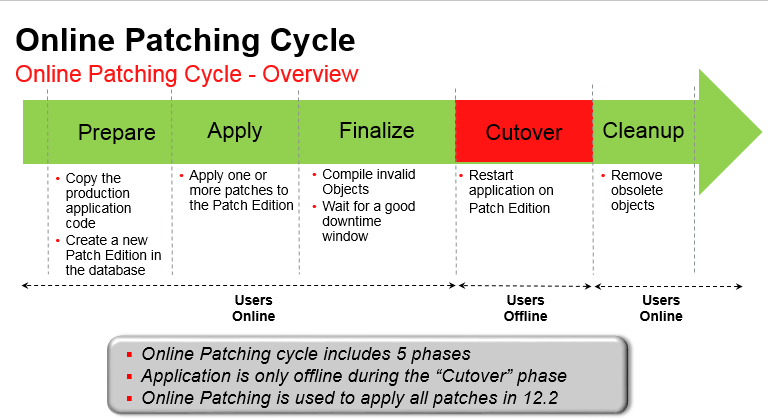
Online patching cycle over view in oracle apps R12.2

Below is the detailed over view of online patching cycle activity.

Adop Phases:

Phase 1- Prepare:


Phase 2- Apply:


Phase 3- Finalize:


Phase 4- Cutover:


Phase 5- Cleanup:


=====================================================================

Adop Abort:


Hope this post helps you to understand patching cycle in oracle apps R12.2 (Adop).

Thursday, 10 March 2016

How to assign responsibilities of one user to another user without using front end oracle apps

In this post we will get to know how to assign all the responsibilities of one user to another user without opening form sessions.

Here we are downloading all the responsibilities of SYSADMIN user and uploading all these responsibilities to user 'NEWUSER'. 

Download Responsibilities:

FNDLOAD apps/<appspwd> 0 Y DOWNLOAD $FND_TOP/patch/115/import/afscursp.lct XX_FND_USER_NEWUSER.ldt FND_USER USER_NAME='SYSADMIN'

Upload Responsibilities:

Now we can upload this file to user 'NEWUSER' using below FNDLOAD

FNDLOAD apps/<appspwd> 0 Y UPLOAD $FND_TOP/patch/115/import/afscursp.lct XX_FND_USER_NEWUSER.ldt FND_USER USER_NAME='NEWUSER


(Note: Make sure that you have this application user 'NEWUSER' has to be created before upload responsibilities.)

In my case, We are assigning SYSADMIN responsibilities to NEWUSER.

Restore INST_TOP if it is deleted or corrupted accidently?

Below steps to restore the INST_TOP if it is deleted or corrupted without using adcfgclone.

Step 1: 

If we have CONTEXT_FILE backup then we can easily restore (follow  step-2). If CONTEXT_FILE is not there then need to follow below steps to restore CONTEXT_FILE.

  perl /clone/bin/adclonectx.pl retrieve 

Step 2:

Once we restored CONTEXT_FILE then run the auto-config using below script. It will recreate INST_TOP without using adcfgcolne.

Run AutoConfig using: "perl $AD_TOP/bin/adconfig.pl contextfile=<CONTEXT_FILE>" command and it will create the $INST_TOP

Wednesday, 9 March 2016

Important FND Tables in Oracle Application

Below are the important FND Tables in Oracle Application.

FND_APPLICATION_TL: 
Stores translated information about all the applications registered with Oracle Application Object Library.

FND_APP_SERVERS: 
This table will track the servers used by the E-Business Suite system.

FND_ATTACHED_DOCUMENTS:
Stores information relating a document to an application entity.

FND_CONCURRENT_PROCESSES:
Stores information about concurrent managers.

FND_CONCURRENT_PROCESSORS:
Stores information about immediate (subroutine) concurrent program libraries.

FND_CONCURRENT_PROGRAMS:
Stores information about concurrent programs. Each row includes a name and description of the concurrent program.

FND_CONCURRENT_PROGRAMS_TL:
Stores translated information about concurrent programs in each of the installed languages.

FND_CONCURRENT_QUEUES:
Stores information about concurrent managers.

FND_CONCURRENT_QUEUE_SIZE:
Stores information about the number of requests a concurrent manager can process at once, according to its work shift.

FND_CONCURRENT_REQUESTS:
Stores information about individual concurrent requests.

FND_CONCURRENT_REQUEST_CLASS:
Stores information about concurrent request types.

FND_CONC_REQ_OUTPUTS: 
This table stores output files created by Concurrent Request.

FND_CURRENCIES:
Stores information about currencies.

FND_DATABASES:
It tracks the databases employed by the eBusiness suite. This table stores information about the database that is not instance specific.

FND_DATABASE_INSTANCES: 
Stores instance specific information. Every database has one or more instance.

FND_DESCRIPTIVE_FLEXS: 
Stores setup information about descriptive flexfields.

FND_DESCRIPTIVE_FLEXS_TL:
Stores translated setup information about descriptive flexfields.

FND_DOCUMENTS:
Stores language-independent information about a document.

FND_EXECUTABLES: 
Stores information about concurrent program executables.

FND_FLEX_VALUES: 
Stores valid values for key and descriptive flexfield segments.

FND_FLEX_VALUE_SETS: 
Stores information about the value sets used by both key and descriptive flexfields.

FND_LANGUAGES:
Stores information regarding languages and dialects.

FND_MENUS: 
It lists the menus that appear in the Navigate Window, as determined by the System Administrator when defining responsibilities for function security.

FND_MENUS_TL:
Stores translated information about the menus in FND_MENUS.

FND_MENU_ENTRIES: 
Stores information about individual entries in the menus in FND_MENUS.

FND_PROFILE_OPTIONS: 
Stores information about user profile options.

FND_REQUEST_GROUPS: 
Stores information about report security groups.

FND_REQUEST_SETS:
Stores information about report sets.

FND_RESPONSIBILITY: 
Stores information about responsibilities. Each row includes the name and description of the responsibility, the application it belongs to, and values that identify the main menu, and the first form that it uses.

FND_RESPONSIBILITY_TL: 
Stores translated information about responsibilities.

FND_RESP_FUNCTIONS: 
Stores security exclusion rules for function security menus. Security exclusion rules are lists of functions and menus inaccessible to a particular responsibility.

FND_SECURITY_GROUPS: 
Stores information about security groups used to partition data in a Service Bureau architecture.

FND_SEQUENCES: 
Stores information about the registered sequences in your applications.

FND_TABLES: 
Stores information about the registered tables in your applications.

FND_TERRITORIES: 
Stores information for countries, alternatively known as territories.

FND_USER: 
Stores information about application users.

FND_VIEWS: 
Stores information about the registered views in your applications.

How to find all responsibilities of a user in oracle apps

Below script to know about the all responsibilities of a user in oracle apps.

Script:

SELECT fu.user_name                "User Name",
       frt.responsibility_name     "Responsibility Name",
       furg.start_date             "Start Date",
       furg.end_date               "End Date",    
       fr.responsibility_key       "Responsibility Key",
       fa.application_short_name   "Application Short Name"
  FROM fnd_user_resp_groups_direct        furg,
       applsys.fnd_user                   fu,
       applsys.fnd_responsibility_tl      frt,
       applsys.fnd_responsibility         fr,
       applsys.fnd_application_tl         fat,
       applsys.fnd_application            fa
 WHERE furg.user_id             =  fu.user_id
   AND furg.responsibility_id   =  frt.responsibility_id
   AND fr.responsibility_id     =  frt.responsibility_id
   AND fa.application_id        =  fat.application_id
   AND fr.application_id        =  fat.application_id
   AND frt.language             =  USERENV('LANG')
   AND UPPER(fu.user_name)      =  UPPER('KRISHNA')  -- <change it>
   -- AND (furg.end_date IS NULL OR furg.end_date >= TRUNC(SYSDATE))
 ORDER BY frt.responsibility_name;

How to find which user have SYSADMIN responsibility in oracle apps

Below script to know the users who have SYSADMIN responsibility in oracle apps.

Script:

SELECT fu.*
FROM fnd_user_resp_groups_direct furgd, fnd_responsibility_vl frvl, fnd_user fu
WHERE furgd.responsibility_id = frvl.responsibility_id
AND fu.user_id = furgd.user_id
AND(to_char(furgd.end_date) is null
OR furgd.end_date > sysdate)
AND frvl.end_date is null
AND frvl.responsibility_name = 'System Administrator';

Output:


Monday, 7 March 2016

RMAN-00600 [8546] Trying To Duplicate Database.

Error:

Duplicating database - control files are restored, data files are stamped, memory script is displayed and then error occurs.

RMAN-00571: ===========================================================
RMAN-00569: =============== ERROR MESSAGE STACK FOLLOWS ===============
RMAN-00571: ===========================================================
RMAN-00601: fatal error in recovery manager
RMAN-03012: fatal error during compilation of command
RMAN-03028: fatal error code for command recover : 600
RMAN-00600: internal error, arguments [8546] [1] [] [] []

duplicate database to TEST backup location '/data01/PROD_BKP/FULL_BKP/' SKIP TABLESPACE DATA,IAS_ORASDPM,MDS, OCS,SOAINFRA nofilenamecheck;

Fix:

Need to follow the below procedure to solve this issue:

1. Use NORESUME in the second duplicate. This will mean that all datafiles will be restored again with the consequent expenditure of time.

or

2. Do not use a RECOVERY CATALOG

or

3.Use explicit set newname for datafiles not converted by a db_file_name_convert clause.


Again  need to start the duplicate clone with :

duplicate database to TEST backup location '/data01/PROD_BKP/FULL_BKP/' SKIP TABLESPACE DATA,IAS_ORASDPM,MDS, OCS,SOAINFRA nofilenamecheck NORESUME;

Ref: (Doc ID 1283862.1)

Monday, 29 February 2016

Error applying patch 10338643:R12.ONT.B. This patch is compatible with: entity 'icx' 'R12.ICX.C'

Issue:

Error when trying to apply Patch 10338643:R12.ONT.B

This patch is not compatible with your current codelines.

This patch is compatible with: entity 'icx' - codeline 'R12.ICX.B'.
Your current on-site codeline for the entity 'icx' is: 'R12.ICX.C'.
You should not apply this patch.
Apply an equivalent patch that is compatible with your current codelines instead.

Solution:

To implement the solution, please execute the following steps:

 1. Unzip the Patch zip file p10338643_R12.ONT.B_R12_GENERIC.zip
 2. In the new directory 10338643, please find the driver file u10338643.drv
 3. Edit this driver file to comment out or remove the following three lines:
    extension fixes 7591737 icx B
    extension includes 7591737 icx B
    extension based on icx B
 4. Run adpatch to apply the patch on your environment. Use this drv file when
     the adpatch utility asks you for the driver file to use.

 Notes:
 1. You need to have proper permissions on the unzipped patch folder to run adpatch from
 2. You must be in Maintenance Mode to apply patches. You can use the AD 
     Administration Utility (adutility) to set Maintenance Mode.
 3. You must ssh or ftp to the env with appmgr access and source the env.
     variables (thereby setting APPL_TOP etc.) before carrying out adpatch command
 4. You must have the Oracle db system and apps schema passwords for the env,
    and appmgr password for the env.

Ref: (Doc ID 1465165.1)

Friday, 26 February 2016

Gather Schema Statistics Is Failing With ORA-20000 Error For Tables Ending With _TAB

Issue:

 FDPSTP failed due to ORA-20000: Unable to analyze TABLE "APPS"."COSTPARAMETERS1358_TAB", insufficient privileges or does not exist
ORA-06512: at "APPS.FND_STATS", line 2457
ORA-06512: at line 1

Cause:

Several tables were created with quotes around their names (all ended with _TAB) during upgrade
however Gather Schema Statistics program (FNDGSCST) does not recognize them and fails.

The csrrsreg.sql script belongs to "Oracle Scheduler" product (CSR)
It registers the XML Schema for Scheduler Rules and creates the
relevant CSR_RULES_B database object to store Scheduler Rules.
It seems that _TAB tables were generated by this script.

Fix: 

*) A simple solution consists in renaming the tables (i.e. removing the quotes), for instance:

alter table "costParameters1358_TAB" rename to costParameters1358_TAB;

However it is recommended to open a new SR with "Oracle Scheduler" product (CSR) team
to validate this solution and to confirm that script csrrsreg.sql is well the cause of this issue.

*) As a workaround the offending tables can be excluded from running statistics.


1. Retrieve the Application ID by running the SELECT statement below:

select application_id from fnd_tables where table_name = <'exact table name'> ;

2. Run the following script once for each table to insert a record
corresponding to it in FND_EXCLUDE_TABLE_STATS, for example:

Begin
fnd_stats.load_xclud_tab('INSERT',<application_id from step 1>,'costParameters1358_TAB');
End;

Check FND_EXCLUDE_TABLE_STATS table has entry of costParameters1358_TAB or "costParameters1358_TAB".


3. Re-run the Gather Schema Statistics or Gather Table Statistics program.

Ref: (Doc ID 1520146.1)

Thursday, 25 February 2016

How to run garbage collection in Weblogic

You can manually request that the JVM perform garbage collection. Make sure that full garbage collection is necessary before selecting it on a server instance. When you perform garbage collection, the JVM often examines every living object in the heap.

To request garbage collection:

1. If you have not already done so, in the Change Center of the Administration Console, click Lock & Edit (see Use the Change Center).

2.In the left pane of the Console, expand Environment > Servers.

3.On the Summary of Servers page, select the server instance for which you will request garbage collection.

4. Select Monitoring > Performance.

5.Click Garbage Collect.

6.Garbage Collect calls the JVM’s System.gc() method to perform garbage collection. The JVM implementation then decides whether or not the request actually triggers garbage collection.

7.To activate these changes, in the Change Center of the Administration Console, click Activate Changes. (Not all changes take effect immediately—some require a restart).

Tuesday, 23 February 2016

Oracle E-Business Suite Applications 12.2.5 New Features


New Features in Oracle apps R12.2.5

This section contains details pertaining to the features that are new or changed since the previous release. Those details are listed where applicable.

Feature Name

1 Enhanced adop user interface
Category
Description
Parameters
Changed UI
The UI of the adop utility has been significantly enhanced, to display more selective information on the console. Messages, prompts and other elements have also been extensively refined to increase the ease of use of the various patching commands.
Dependent on operation

2 New adop monitoring and validation features
Category
Description
Parameters
New features
Progress of an online patching cycle can be followed by running the new Online Patching Monitoring utility (adopmon). This utility can be used to follow the overall progress of a patching cycle, as well as identifying the various individual adop actions being taken.

$ adopmon

Before you start a new patching cycle by running the prepare phase, you can optionally check your system's readiness by running adop with the 'validate' option. If you do this while a patching cycle is in progress, validation will take place for the cutover phase.
$ adop -validate

3 Support for new EBS Installation Central Inventory
Category
Description
Parameters
New feature
Support for an instance-specific EBS Installation Central Inventory has been introduced as an option for the application tier on UNIX platforms. The inventory is identified by <s_base>/oraInventory/oraInst.loc. This feature is useful where multiple Oracle E-Business Suite installations exist on the same host, helping to avoid issues when fs_clone is run simultaneously on different instances.

To use the EBS Installation Central Inventory, all application tier Oracle Homes registered in the global inventory for the instance must be migrated to the new inventory.
Not applicable

4 Oracle WebLogic Server performance improvements
Category
Description
Parameters
New options
  • A new -DserverType=wlx start argument for managed servers reduces their memory footprint, by preventing startup of the Enterprise JavaBeans (EJB), Java EE Connector Architecture (JCA), and Java Message Service (JMS) services.
-DserverType=wlx

  • To reduce oacore startup time, the Portlet Producer libraries are no longer deployed to the EBS domain. A new context variable, s_deploy_portlet, has been introduced to cater for cases where portlet-related configuration is required, such as in instances needing Webcenter integration.
s_deploy_portlet
New mode
The default value of s_forms-c4wsstatus is now set to 'Disabled'.Thus, the formsc4-ws servers are no longer started during a 'start all' operation.
s_forms-c4wsstatus

5 New 'dualfs' option in standard cloning

Category
Description
Parameters
New option
A new 'dualfs' option is available when performing a standard clone, as well as while adding a new node. With the 'dualfs' option, both the run and patch file systems are cloned and configured in a single operation.
dualfs

Ref: (Doc ID 2050998.1)

ORA-00060: deadlock detected while waiting for RESOURCE DB PREP during Online Patching Enablement script (Database Preparation script) execution.

Error details:

ORA-00060: deadlock detected while waiting for RESOURCE DB PREP
begin APPS.ad_zd_mviews.upgrade('APPS','<Materialized View>'); end;

Related Bug:12901059  in R12.2

Workaround:
Re-run the script manually, outside the Online Patching.

SQL>begin APPS.ad_zd_mviews.upgrade('APPS','<Failed Materialized View>'); end;

(Ref: Doc ID 2050998.1)

adop exits with the error "Unable to acquire lock on ad_adop_sessions table." Related to bug: 17650145

Issue:

adop exits with the error "Unable to acquire lock on ad_adop_sessions table." Related to bug: 17650145.

Error details: This error does not appear consistently. It may be caused by another adop process running on the same node in another session, or on other nodes.

Identify Issue:

$ ps -ef | grep adzdoptl.pl

This will check for the existence of other adop sessions. If any are found, wait for them either to complete or error out. If no other sessions exist, log a service request to obtain further assistance.

How To diagnose the "Root Cause" of OPP (java process) consuming High CPU

To find the "Root Cause" for OPP (java) processes consuming High CPU.  Most of the time it is due to un-optimized "Template Code" that causes slowness. This document helps to identify the "Template code" that could be the potential cause. It could be either Standard Template Code (provided by Oracle) or Custom (designed by in-house team).

Issue:


Below Steps to Identify/Resolve the OPP (java) process issue.

1. Identify <PID> of OPP that is spinning. Use top (or) prstat
2. Generate the java thread dump.
  2.1 $kill -3
3. Get “thread ID” which consumes High CPU. Use this command.
  3.1 $ ps -eLo pid,ppid,tid,pcpu,comm | grep <PID>
4. Convert the “thread ID” to Hexadecimal which helps to identify the “Template code” (potential cause).
5. Resolution - Optimizing the Template code.

(Ref: Doc ID 2028617.1)

Sunday, 21 February 2016

What is ADOP in Oracle Apps R12.2

ADOP is Online Patching utility tool. It will Perform all the below tasks required to apply the patch in R12.2.

*)  Reads the patch metadata to determine patch dependencies and requirements.
*)  Attempt to recover previously failed patching session (if any).
*)  Reads and validate the patch/product driver files.
*)  Compare the version numbers of existing files against the patch files and Backs up all existing        files         that will be changed by the patch.
*)  Copy the files from patch.
*)  Archive files in libraries.
*)  Relinks executable s, Generates forms, reports, messages, graphics, and Java archive (JAR) files.
*)  Compiles JSP files and invalid database objects. Update into database objects.
*)  Runs AutoConfig if required.
*)  Save all the patches information into the database.

All tasks are similar to what adpatch utility used to do earlier in R12.1.

Next : Patching Procedure in oracle apps R12.2

Saturday, 20 February 2016

