Saturday, 9 January 2016

Health check of oracle Ebiz database and applications

The below script is very useful to get the health check of oracle ebiz database and application.

Script:

SQL>conn apps/***
SQL>spool health_check_apps_db.out

set pages 1000
set linesize 135
col PROPERTY_NAME for a25
col PROPERTY_VALUE for a15
col DESCRIPTION for a35
col DIRECTORY_PATH for a70
col directory_name for a25
col OWNER for a10
col DB_LINK for a40
col HOST for a20
col "User_Concurrent_Queue_Name" format a50 heading 'Manager'
col "Running_Processes" for 9999 heading 'Running'
set head off
set feedback off
set echo off

break on utl_file_dir

select '--------------------------------------------------------------------------------' from dual;
select '-----------------------     Database Checks    ---------------------------------' from dual;
select '--------------------------------------------------------------------------------' from dual;
Prompt
select '************************ Getting Database Information  *************' from dual ;

select 'Database Name..................... : '||name from v$database;
select 'Database Status................... : '||open_mode from v$database;
select 'Archiving Status.................. : '||log_mode  from v$database;
select 'Global Name....................... : '||global_name from global_name;
select 'Creation Date..................... : '||to_char(created,'DD-MON-YYYY HH24:MI:SS') from v$database;
select 'Checking For Missing File......... : '||count(*) from v$recover_file;
select 'Checking Missing File Name ....... : '||count(*) from v$datafile where name like '%MISS%';
select 'Total SGA ........................ : '||round(sum(value)/(1024*1024))||' MB' from v$sga ;
select 'Database Version.................. : '||version from v$instance;
select 'Temporary Tablespace.............. : '||property_value from database_properties
                                                where property_name like 'default_temp_tablespace';
select 'Apps Temp Tablespace.............. : '||temporary_tablespace from dba_users where username like '%APPS%';
select 'Temp Tablespace size.............. : '||sum(maxbytes/1024/1024/1024)||' GB' from dba_temp_files group by tablespace_name;
select 'No of Invalid Object ............. : '||count(*) from dba_objects where status = 'INVALID' ;
select 'service Name...................... : '||value from v$parameter2 where name='service_names';
select 'plsql code type................... : '||value from v$parameter2 where name='plsql_code_type';
select 'plsql subdir count................ : '||value from v$parameter2 where name='plsql_native_library_subdir_count';
select 'plsql native library dir.......... : '||value from v$parameter2 where name='plsql_native_library_dir';
select 'Shared Pool Size.........,........ : '||(value/1024/1024) ||' MB' from v$parameter where name='shared_pool_size';
select 'Log Buffer........................ : '||(value/1024/1024) ||' MB' from v$parameter where name='log_buffer';
select 'Buffer Cache...................... : '||(value/1024/1024) ||' MB' from v$parameter where name='db_cache_size';
select 'Large Pool Size................... : '||(value/1024/1024) ||' MB' from v$parameter where name='large_pool_size';
select 'Java Pool Size.................... : '||(value/1024/1024) ||' MB' from v$parameter where name='java_pool_size';
select 'utl_file_dir...................... : '||value from v$parameter2 where name='utl_file_dir';
select directory_name||'.................... : '||directory_path from all_directories where rownum  < 15 ;

select '************************ Getting Apps Information *****************' from dual ;

select 'Home URL.......................... : '||home_url from apps.icx_parameters ;
select 'Session Cookie.................... : '||session_cookie from apps.icx_parameters ;
select 'Applicaiton Database ID........... : '||fnd_profile.value('apps_database_id') from dual;
select 'GSM Enabled....................... : '||fnd_profile.value('conc_gsm_enabled') from dual;
select 'Maintainance Mode................. : '||fnd_profile.value('apps_maintenance_mode') from dual;
select 'Site Name......................... : '||fnd_profile.value('Sitename')from dual;
select 'Bug Number........................ : '||bug_number from ad_bugs where bug_number='2728236';

select '************************ Doing Workflow Checks ********************' from dual ;

select 'No Open Notifications............. : '||count(*) from wf_notifications where mail_status in('MAIL','INVALID','OPEN');
select 'Name(wf_systems).................. : '||name from wf_systems;
select 'Display Name(wf_systems).......... : '||display_name from wf_systems;
select 'Address........................... : '||address from wf_agents;
select 'Workflow Mailer Status............ : '||component_status from applsys.fnd_svc_components
                                                where component_name like 'Workflow Notification Mailer';
select 'Test Address...................... : '||b.parameter_value
                                                from fnd_svc_comp_param_vals_v a, fnd_svc_comp_param_vals b
                                                where a.parameter_id=b.parameter_id
                                                and a.parameter_name in ('TEST_ADDRESS');
select 'From Address...................... : '||b.parameter_value
                                                from fnd_svc_comp_param_vals_v a, fnd_svc_comp_param_vals b
                                                where a.parameter_id=b.parameter_id
                                                and a.parameter_name in ('FROM');
select 'WF Admin Role..................... : '||text from wf_resources where name = 'WF_ADMIN_ROLE' and  rownum =1;


Prompt
Prompt Getting Apps Node Info
Prompt ************************
select Node_Name,'........................ : '||server_id from fnd_nodes;
select server_type||'......................: '||name from fnd_app_servers, fnd_nodes
                                                where fnd_app_servers.node_id =fnd_nodes.node_id;

select '************************ Doing Conc Mgr Checks  ********************' from dual ;

Prompt Getting Con Mgr Status
Prompt ************************
Prompt
Prompt Manager Name                                                 Hostname          No of Proc Running
Prompt ~~~~~~~~~~~~                                                 ~~~~~~~~          ~~~~~~~~~~~~~~~~~~
set lines 145
Column Target_Node   Format A12
select User_Concurrent_Queue_Name,'....... : '||Target_Node||' ...... : '||Running_Processes
                                                from fnd_concurrent_queues_vl
                                                where Running_Processes = Max_Processes
                                                and Running_Processes > 0;

Prompt
Prompt Getting Pending Request
Prompt ***********************
--select user_concurrent_program_name||'........ : '||request_id
--                                                  from fnd_concurrent_requests r, fnd_concurrent_programs_vl p, fnd_lookups s, fnd_lookups ph
--                                                  where r.concurrent_program_id = p.concurrent_program_id
--                                                 and r.phase_code = ph.lookup_code
--                                                and ph.lookup_type = 'CP_PHASE_CODE'
--                                               and r.status_code = s.lookup_code
--                                                  and s.lookup_type = 'CP_STATUS_CODE'
--                                                  and ph.meaning ='Pending'
--                                                  and rownum < 10
--                                                  order by to_date(actual_start_date, 'dd-MON-yy hh24:mi');
--

Prompt
Prompt Getting Workflow Components Status
Prompt **********************************

set pagesize 1000
set linesize 125
col COMPONENT_STATUS for a20
col COMPONENT_NAME for a45
col STARTUP_MODE for a12

select fsc.COMPONENT_NAME,
fsc.STARTUP_MODE,
fsc.COMPONENT_STATUS,
fcq.MAX_PROCESSES TARGET,
fcq.RUNNING_PROCESSES ACTUAL
from APPS.FND_CONCURRENT_QUEUES_VL fcq, APPS.FND_CP_SERVICES fcs,
APPS.FND_CONCURRENT_PROCESSES fcp, fnd_svc_components fsc
where fcq.MANAGER_TYPE = fcs.SERVICE_ID
and fcs.SERVICE_HANDLE = 'FNDCPGSC'
and fsc.concurrent_queue_id = fcq.concurrent_queue_id(+)
and fcq.concurrent_queue_id = fcp.concurrent_queue_id(+)
and fcq.application_id = fcp.queue_application_id(+)
and fcp.process_status_code(+) = 'A'
order by fcp.OS_PROCESS_ID, fsc.STARTUP_MODE;

select '--------------------------------------------------------------------------------' from dual;
select '-----------------------     End Of Database Checks  ----------------------------' from dual;
select '--------------------------------------------------------------------------------' from dual;


SQL>spool off

Hope this post helps you :)

Thursday, 7 January 2016

Cocurrent managers details from backend in oracle application

Below script to get all the concurrent manager details in oracle apps.

Script:

set lines 199
----set pagesize 9999
select
decode (CONCURRENT_QUEUE_NAME,
'FNDICM','Internal Manager',
'FNDCRM','Conflict Resolution Manager',
'AMSDMIN','Marketing Data Mining Manager',
'C_AQCT_SVC','C AQCART Service',
'FFTM','FastFormula Transaction Manager',
'FNDCPOPP','Output Post Processor',
'FNDSCH','Scheduler/Prereleaser Manager',
'FNDSM_AQHERP','Service Manager: AQHERP',
'FTE_TXN_MANAGER','Transportation Manager',
'IEU_SH_CS','Session History Cleanup',
'IEU_WL_CS','UWQ Worklist Items Release for Crashed session',
'INVMGR','Inventory Manager',
'INVTMRPM','INV Remote Procedure Manager',
'OAMCOLMGR','OAM Metrics Collection Manager',
'PASMGR','PA Streamline Manager',
'PODAMGR','PO Document Approval Manager',
'RCVOLTM','Receiving Transaction Manager',
'STANDARD','Standard Manager',
'WFALSNRSVC','Workflow Agent Listener Service',
'WFMLRSVC','Workflow Mailer Service',
'WFWSSVC','Workflow Document Web Services Service',
'WMSTAMGR','WMS Task Archiving Manager',
'XDP_APPL_SVC','SFM Application Monitoring Service',
'XDP_CTRL_SVC','SFM Controller Service',
'XDP_Q_EVENT_SVC','SFM Event Manager Queue Service',
'XDP_Q_FA_SVC','SFM Fulfillment Actions Queue Service',
'XDP_Q_FE_READY_SVC','SFM Fulfillment Element Ready Queue Service',
'XDP_Q_IN_MSG_SVC','SFM Inbound Messages Queue Service',
'XDP_Q_ORDER_SVC','SFM Order Queue Service',
'XDP_Q_TIMER_SVC','SFM Timer Queue Service',
'XDP_Q_WI_SVC','SFM Work Item Queue Service',
'XDP_SMIT_SVC','SFM SM Interface Test Service') as "Concurrent Manager's Name",
max_processes as "TARGET Processes",
running_processes as "ACTUAL Processes"
from apps.fnd_concurrent_queues where CONCURRENT_QUEUE_NAME in
('FNDICM','FNDCRM','AMSDMIN','C_AQCT_SVC','FFTM','FNDCPOPP','FNDSCH','FNDSM_AQHERP',
'FTE_TXN_MANAGER','IEU_SH_CS','IEU_WL_CS','INVMGR','INVTMRPM','OAMCOLMGR','PASMGR',
'PODAMGR','RCVOLTM','STANDARD','WFALSNRSVC','WFMLRSVC','WFWSSVC','WMSTAMGR',
'XDP_APPL_SVC','XDP_CTRL_SVC','XDP_Q_EVENT_SVC','XDP_Q_FA_SVC','XDP_Q_FE_READY_SVC',
'XDP_Q_IN_MSG_SVC','XDP_Q_ORDER_SVC','XDP_Q_TIMER_SVC','XDP_Q_WI_SVC','XDP_SMIT_SVC');

Output:


Tablespace growth report using sqlplus

Below script to find the growth of tablespace in oracle database:

Script:

set linesize 120
column name format a15
column variance format a20
alter session set nls_date_format='yyyy-mm-dd';
with t as (
select ss.run_time,ts.name,round(su.tablespace_size*dt.block_size/1024/1024/1024,2) alloc_size_gb,
round(su.tablespace_usedsize*dt.block_size/1024/1024/1024,2) used_size_gb
from
dba_hist_tbspc_space_usage su,
(select trunc(BEGIN_INTERVAL_TIME) run_time,max(snap_id) snap_id from dba_hist_snapshot
group by trunc(BEGIN_INTERVAL_TIME) ) ss,
v$tablespace ts,
dba_tablespaces dt
where su.snap_id = ss.snap_id
and   su.tablespace_id = ts.ts#
---and   ts.name          =upper('&TABLESPACE_NAME')
and   ts.name          = dt.tablespace_name )
select e.run_time,e.name,e.alloc_size_gb,e.used_size_gb curr_used_size_gb,b.used_size_gb prev_used_size_gb,
case when e.used_size_gb > b.used_size_gb then to_char(e.used_size_gb - b.used_size_gb)
     when e.used_size_gb = b.used_size_gb then '***NO DATA GROWTH'
     when e.used_size_gb < b.used_size_gb then '******DATA PURGED' end variance
from t e, t b
where e.run_time = b.run_time + 1
order by 1;

Output:


Oracle database growth

Below script to get the growth of the oracle database

Script:

select to_char(CREATION_TIME,'RRRR') year,to_char(CREATION_TIME,'MM') month,round(sum(bytes)/1024/1024/1024) gb
from v$datafile group by to_char(CREATION_TIME,'RRRR'),to_char(CREATION_TIME,'MM') order by 1,2;

Output:

SQL> select to_char(CREATION_TIME,'RRRR') year,to_char(CREATION_TIME,'MM') month,round(sum(bytes)/1024/1024/1024) gb
from v$datafile group by to_char(CREATION_TIME,'RRRR'),to_char(CREATION_TIME,'MM') order by 1,2;  2

YEAR MO         GB
---- -- ----------
2000 04         10
2001 05          2
2001 10          1
2001 11          0
2001 12          4
2002 05          0
2003 05          1
2004 05         33
2004 09         10
2004 12          0
2005 02          0

YEAR MO         GB
---- -- ----------
2005 05          7
2005 07          8
2006 07          2
2007 06          8
2008 01          6
2008 07        234
2008 11          4
2009 01         32
2009 05          8
2009 12          8
2010 05         29

YEAR MO         GB
---- -- ----------
2010 06          8
2010 07          8
2010 08          8
2010 09          8
2010 10          8
2010 12         16
2011 04         16
2011 06          8
2011 07          8
2011 09          8
2011 12          8

YEAR MO         GB
---- -- ----------
2012 03          8
2012 04          8
2012 05          5
2012 06         22
2012 07          8
2012 08         24
2012 09         16
2012 10         43
2012 11         24
2012 12         24
2013 01        105

YEAR MO         GB
---- -- ----------
2013 04         56
2013 05         16
2013 07          8
2013 08         20
2013 09         32
2013 10         96
2013 12         16
2014 01         16
2014 02          4
2015 03         31
2015 08          2

YEAR MO         GB
---- -- ----------
2015 11         13
2015 12         10

57 rows selected.

Monday, 7 December 2015

How to check product patch level or code level oracle apps

Below script to know the patch level or code level of oracle apps.

Script:

SELECT app_short_name, MAX(patch_level)
FROM apps.ad_patch_driver_minipks
GROUP BY app_short_name ;

Output:

APP_SHORT_NAME MAX(PATCH_LEVEL)
----------------------------------------------------------------------
ITA                    R12.ITA.B.3
ISC                     R12.ISC.B.3

Tuesday, 17 November 2015

How to find the character set of oracle database

Below script to find out the character set of oracle database.

SQL> SELECT value$ FROM sys.props$ WHERE name = 'NLS_CHARACTERSET' ;

VALUE$
-----------------
US7ASCII

Script:

SELECT * FROM NLS_DATABASE_PARAMETERS;

Output:

SQL> SELECT * FROM NLS_DATABASE_PARAMETERS;

PARAMETER                      VALUE
------------------------------ ----------------------------------------
NLS_LANGUAGE                   AMERICAN
NLS_TERRITORY                  AMERICA
NLS_CURRENCY                   $
NLS_ISO_CURRENCY               AMERICA
NLS_NUMERIC_CHARACTERS         .,
NLS_CHARACTERSET               US7ASCII
NLS_CALENDAR                   GREGORIAN
NLS_DATE_FORMAT                DD-MON-RR
NLS_DATE_LANGUAGE              AMERICAN
NLS_NCHAR_CHARACTERSET         AL16UTF16
NLS_CSMIG_SCHEMA_VERSION       2
NLS_SORT                       BINARY
NLS_TIME_FORMAT                HH.MI.SSXFF AM
NLS_TIMESTAMP_FORMAT           DD-MON-RR HH.MI.SSXFF AM
NLS_TIME_TZ_FORMAT             HH.MI.SSXFF AM TZH:TZM
NLS_SAVED_NCHAR_CS             US7ASCII
NLS_TIMESTAMP_TZ_FORMAT        DD-MON-RR HH.MI.SSXFF AM TZH:TZM
NLS_DUAL_CURRENCY              $
NLS_COMP                       BINARY
NLS_LENGTH_SEMANTICS           BYTE
NLS_NCHAR_CONV_EXCP            FALSE
NLS_RDBMS_VERSION              11.2.0.3.0

How to know the size of oracle database 11g

This post will helps you to find out the total,free and used size of  oracle database.

To know the total size of your database.

Script:

select 
( select sum(bytes)/1024/1024/1024 data_size from dba_data_files ) +
( select nvl(sum(bytes),0)/1024/1024/1024 temp_size from dba_temp_files ) +
( select sum(bytes)/1024/1024/1024 redo_size from sys.v_$log ) +
( select sum(BLOCK_SIZE*FILE_SIZE_BLKS)/1024/1024/1024 controlfile_size from v$controlfile) "Size in GB"
from
dual

Output:

Size in GB
----------

1115.77302

To know the Total, Used and Free space of your Database.

Script:

col "Database Size" format a20 
col "Free space" format a20 
col "Used space" format a20 
select round(sum(used.bytes) / 1024 / 1024 / 1024 ) || ' GB' "Database Size" 
, round(sum(used.bytes) / 1024 / 1024 / 1024 ) - 
round(free.p / 1024 / 1024 / 1024) || ' GB' "Used space" 
, round(free.p / 1024 / 1024 / 1024) || ' GB' "Free space" 
from (select bytes 
from v$datafile 
union all 
select bytes 
from v$tempfile 
union all 
select bytes 
from v$log) used 
, (select sum(bytes) as p 
from dba_free_space) free 
group by free.p 
/

Output:

Database Size        Used space           Free space
-------------------- -------------------- --------------------
1116 GB              580 GB               536 GB


Below script to know the particular datafile size of your database.

Script:

set pagesize 100
column file_name format a32
column tablespace_name format a15
column status format a3 trunc
column t format 999,999.000 heading "Total MB"
column a format a4 heading "Aext"
column p format 990.00 heading "% Free"
SELECT df.file_name,
df.tablespace_name,
df. status,
(df.bytes/1024000) t,
(fs.s/df.bytes*100) p,
decode (ae.y,1,'YES','NO') a
FROM dba_data_files df,
(SELECT file_id,SUM(bytes) s
FROM dba_free_space
GROUP BY file_id) fs,
(SELECT file#, 1 y
FROM sys.filext$
GROUP BY file#) ae
WHERE df.file_id = fs.file_id
AND ae.file#(+) = df.file_id
ORDER BY df.tablespace_name, df.file_id;
column file_name clear
column tablespace_name clear
column status clear
column t clear
column a clear
column p clear
ttitle off

Output:

FILE_NAME                        TABLESPACE_NAME STA     Total MB  % Free Aext
-------------------------------- --------------- --- ------------ ------- ----
/d05/oracle/proddata/absl01.dbf  ABSL            AVA    1,142.000    6.52 YES
/d05/oracle/proddata/absl02.dbf  ABSL            AVA    1,806.336    6.94 YES

Hope this post will helps you :)

Wednesday, 4 November 2015

How to know the concurrent request details using Request id in oracle apps R12

Below script to find the concurrent request details using Request Id.

Script:

set head off
set verify off
set echo off
set pages 1500
set linesize 100
set lines 120
prompt
prompt Request_ID
prompt ==================================
select /*+ CHOOSE*/
'Session  Id.............................................: '||s.sid,
'Serial Num..............................................: '||s.serial#,
'User Name ..............................................: '||s.username,
'Session Status .........................................: '||s.status,
'Client Process Id on Client Machine ....................: '||'*'||s.process||'*'  Client,
'Server Process ID ......................................: '||p.spid Server,
'Sql_Address ............................................: '||s.sql_address,
'Sql_hash_value .........................................: '||s.sql_hash_value,
'Schema Name ..... ......................................: '||s.SCHEMANAME,
'Program  ...............................................: '||s.program,
'Module .................................................: '|| s.module,
'Action .................................................: '||s.action,
'Terminal ...............................................: '||s.terminal,
'Client Machine .........................................: '||s.machine,
'LAST_CALL_ET ...........................................: '||s.last_call_et,
'S.LAST_CALL_ET/3600 ....................................: '||s.last_call_et/3600,
'E.SQL_TEXT .............................................: '||E.SQL_TEXT
from v$session s, v$process p, V$SQL E
where p.addr=s.paddr AND s.SQL_ADDRESS = E.ADDRESS and
s.sid in (SELECT d.sid FROM apps.fnd_concurrent_requests a,
apps.fnd_concurrent_processes b, v$process c,v$session d
WHERE a.controlling_manager = b.concurrent_process_id
AND c.pid = b.oracle_process_id
AND b.session_id=d.audsid
AND a.request_id = &Request_ID);

Output:


Enter value for request_id: 31321705

Session  Id.............................................: 2289
Serial Num..............................................: 8075
User Name ..............................................: APPS
Session Status .........................................: ACTIVE
Client Process Id on Client Machine ....................: *57551*
Server Process ID ......................................: 4203
Sql_Address ............................................: 00000006B1BC9010
Sql_hash_value .........................................: 3255635558
Schema Name ..... ......................................: APPS
Program  ...............................................: STANDARD@erpappsp1 (TNS V1-V3)
Module .................................................: CSICORSY
Action .................................................: Concurrent Request
Terminal ...............................................:
Client Machine .........................................: erpappsp1
LAST_CALL_ET ...........................................: 287646
S.LAST_CALL_ET/3600 ....................................: 79.9016666666666666666666666666666666667
E.SQL_TEXT .............................................: BEGIN CSI_DIAGNOSTICS_PKG.IB_SYNC(:errbuf,:rc,:A0,:A1,:A2); EN

D;

Friday, 30 October 2015

How to find all the applied patches details from oracle apps R12

In this post, i will show you how to know all the applied patches details including (Patch number,creation date and patch type).


If you are looking for details of specific patch that was applied, you can use the below script to find the details.

Script:
col PATCH_NAME format a10
col PATCH_TYPE format a10
col DRIVER_FILE_NAME format a15
col PLATFORM format a10
select AP.PATCH_NAME, AP.PATCH_TYPE, AD.DRIVER_FILE_NAME, AD.CREATION_DATE,  AD.PLATFORM,AL.LANGUAGE
from AD_APPLIED_PATCHES AP, AD_PATCH_DRIVERS AD, AD_PATCH_DRIVER_LANGS AL
where AP.APPLIED_PATCH_ID = AD.APPLIED_PATCH_ID
and AD.PATCH_DRIVER_ID = AL.PATCH_DRIVER_ID
and AP.PATCH_NAME = '1423433';
Output:
PATCH_NAME PATCH_TYPE DRIVER_FILE_NAM CREATION_DATE   PLATFORM   LANG
---------- ---------- --------------- --------------- ---------- ----
1423433    PATCH-SET  u1423433.drv    01-SEP-15       GENERIC      US


If you are looking for the details of all patches that was applied, you can use the below script to find the details.


Script:
col PRD format a40 trunc
col PRDID format a5
col PRDSTATUS format a10
col PATCHSET format a20
SELECT V.APPLICATION_NAME PRD, to_char(V.APPLICATION_ID) PRDID, L.MEANING PRDSTATUS, DECODE(I.PATCH_LEVEL, NULL, '11i.' || v.APPLICATION_SHORT_NAME || '.?', I.PATCH_LEVEL) patchset
FROM FND_APPLICATION_ALL_VIEW V, FND_PRODUCT_INSTALLATIONS I, FND_LOOKUPS L
WHERE (V.APPLICATION_ID = I.APPLICATION_ID)
AND (L.LOOKUP_TYPE = 'FND_PRODUCT_STATUS')
AND (L.LOOKUP_CODE = I.Status )
ORDER BY 1;

Output:
PATCH_NO PATCH_TYPE DRIVER_FILE_NAME CREATION_DATE PLATFORM LANGUAGE
10422612 ONE-OFF u10422612.drv 5-Aug-12 GENERIC US
9922442 ONE-OFF u9922442.drv 15-Feb-13 GENERIC US
6524778 ONE-OFF u6524778.drv 3-Jul-13 GENERIC US
12609242 ONE-OFF u12609242.drv 14-Jul-13 GENERIC US
9839039 ONE-OFF u9839039.drv 14-Aug-14 GENERIC US
9239089 PATCH-SET u9239089.drv 15-Aug-14 SUN_OS5 US
9239090 MAINTENANCE-PACK u9239090.drv 15-Aug-14 SUN_OS5 US

Hope this post will helps you :)

Wednesday, 28 October 2015

How to reset the Weblogic admin server password

If you lose or forget your weblogic admin server password, and you can follow the below steps to reset it.

Here we tested it in Weblogic server 10.3..

Step 1:
Set the following environment variables (update the domain name    as appropriate):

export FMW_HOME=/u01/app/oracle/product/middleware
export DOMAIN_HOME=$FMW_HOME/user_projects/domains/<domain_name>
export CLASSPATH=$CLASSPATH:$MW_HOME/wlserver_10.3/server/lib/weblogic.jar

Run the env as shown below.
. $DOMAIN_HOME/bin/setDomainEnv.sh

Step 2:
Shut down your weblogic domain:
$DOMAIN_HOME/bin/stopWebLogic.sh

Step 3:
Rename and backup the DefaultAuthenticatorInit.ldift file as shown below,

cd $DOMAIN_HOME/security
mv DefaultAuthenticatorInit.ldift DefaultAuthenticatorInit.ldift.old

Now run the following command to generate a new DefaultAuthenticatorInit.ldift file. ((here ‘weblogic’ is default username))

java weblogic.security.utils.AdminAccount <username> <new_password> .

Note: Don't forget the period "." at the end of the this command, otherwise you will get "Error: Invalid arguments"

Rename and backup the following LDAP directory.

mv $DOMAIN_HOME/servers/AdminServer/data/ldap $DOMAIN_HOME/servers/AdminServer/data/ldap.old
(This ldap directory will be recreated once weblogic server startup time)

Step 4:

Back and Edit the boot.properties file and update the new password. (Above new_password)

cd $DOMAIN_HOME/servers/AdminServer/security
cp boot.properties  boot.properties_old

vi boot.properties
password=<username>
username=<new_password>

(Note: New password will be encrypted once server starts)

Step 5:

Now start your weblogic domain.

[oracle@fa bin]# cd /root/MW_home/user_projects/domains/base_domain/bin/
[oracle@fa bin]# ls
nodemanager  nohup.out  server_migration  service_migration  setDomainEnv.sh 
startManagedWebLogic.sh  startWebLogic.sh  stopManagedWebLogic.sh  stopWebLogic.sh
[oracle@fa bin]# nohup ./startWebLogic.sh &
[oracle@fa bin]# nohup: appending output to `nohup.out'
[oracle@fa bin]# tail -f nohup.out 

Server state during the startup:
<Aug 7, 2013 11:07:18 AM IST> <Notice> <WebLogicServer> <BEA-000365> <Server state changed to STANDBY> 
<Aug 7, 2013 11:07:18 AM IST> <Notice> <WebLogicServer> <BEA-000365> <Server state changed to STARTING> 
<Aug 7, 2013 11:07:21 AM IST> <Notice> <WebLogicServer> <BEA-000365> <Server state changed to ADMIN> 
<Aug 7, 2013 11:07:21 AM IST> <Notice> <WebLogicServer> <BEA-000365> <Server state changed to RESUMING> 
<Aug 7, 2013 11:07:22 AM IST> <Notice> <WebLogicServer> <BEA-000365> <Server state changed to RUNNING> 
<Aug 7, 2013 11:07:22 AM IST> <Notice> <WebLogicServer> <BEA-000360> <Server started in RUNNING mode> 

Now you can access your weblogic console page.

Hope this post will helps you :)

Tuesday, 27 October 2015

How to change the weblogic password in oracle apps R12.2

In Oracle E-Business suite R12.2, The default admin user name is "weblogic" will be created during the installation and it will use the same password that has been configured during Installation.

As per security policies and business requirement we may need to change the weblogic admin password.

There are two supported options for changing the  weblogic admin password.
1) If you know the password and you want to change for the security reasons.
2)If you lost forgotten weblogic admin user password .

In this post, i will show you how to change the weblogic admin user password, if you know the old password.

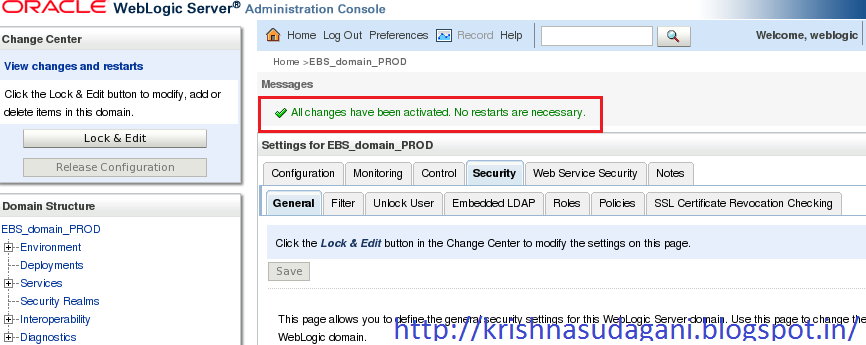
Login to weblog server console with old password.


Click in Domain.

Click on Security.


Click on Advance Tab.


Update the new password which you want to configure for weblogic admin user.


Click on Save.


Verify setting are updated successfully and then Click in Activate changes.
Verify all the changes has been updated.
Click on Security Realms.

Click on myrealm.
Select users and groups and select Weblogic user.
Update the same password as we have provided above for node manager.
Make sure the setting has been updated successfully.
After completed all these steps we need edit and configure the "boot.properties" file for changing the new password.
Note: Before changing anything in boot.properties file please take the backup and edit.

$FMW_HOME/user_projects/domains/EBS_domain_/servers/AdminServer/security/boot.properties
$FMW_HOME/user_projects/domains/EBS_domain_/servers/forms-c4ws_server1/data/nodemanager/boot.properties
$FMW_HOME/user_projects/domains/EBS_domain_/servers/forms_server1/data/nodemanager/boot.properties
$FMW_HOME/user_projects/domains/EBS_domain_/servers/oacore_server1/data/nodemanager/boot.properties
$FMW_HOME/user_projects/domains/EBS_domain_/servers/oafm_server1/data/nodemanager/boot.properties

In our case we need select $FMW_HOME/user_projects/domains/EBS_domain_/servers/AdminServer/security/boot.properties

After updating the new password into boot.properties file, Please rester the application services. After restarting make sure all the application services are started successfully. Verify that you are able to access the weblogic admin console and ERP application login page.

I hope it will help you :)

Sunday, 25 October 2015

Interview questions related to patching activity in oracle apps R12.

1. What are the different types of patches?
One-off, mini packs, family packs, maintenance packs, rollup patches, consolidated patches.

2. What is a one-off patch?
A one-off patch is a small patch of (20-90K size) without any pre-req.

3. What is a mini pack?
A mini pack is one which will upgrade any product patch set level to next level like AD.H to AD.I

4. What is Family pack?
A Family pack is one which will upgrade the patch set level of all the products in that family to particular patchsetlevel.

5. What is Maintenance pack?
A maintenance pack will upgrade applications from one version to another like 12.1.0 to 12.1.1

6. What is a Rollup patch?
A rollup patch is one which will deliver bug fixes identified after the release of any major application versions like 12.1.0/12.1.1

7. What is consolidated patch?
Consolidated patches will come into pictures after upgrades from one version of applications to another, all post upgrade patches will a consolidated and given as consolidated patch.

8. How u will find whether a patch is applied/not?
Query ad bugs.


9. What is the other table where u can query what are the patches applied?
Ad_applied_patches

10. What is the difference between ad_bugs and ad_applied_patches?
A patch can deliver solution for more than one bug, so ad_applied_patches may not give u the perfect information as in case of ad_bugs.

11. How u apply a patch?
adpatch

12. What inputs you need to apply a patch other than driver name and etc?
Apps and system passwords

13. What are the table u r adpatch will create and when?
Adpatch will create FND_INSTALL_PROCESSES and AD_DEFERRED_JOBS table when it will apply d,g and u drivers.

14. What is the significance of FND_INSTALL_PROCESSES and AD_DEFERRED_JOBS table?
FND_INSTALL_PROCESSES table will store the worker information like what job is assigned to which worker and its status. AD_DEFERRED_JOBS will come into picture when some worker is failed, it will be moved to AD_DEFERRED_JOBS table, from where again adpatch will take that job and try to resign, after doing this 3 times if still that worker is failing, then adpatch will stop patching and throw the error that particular worker has failed. We need to trouble shoot and restart the worker.

15. If it is a multi-node installation which driver we need to apply on which node?
c,d,g on concurrent node and c, g on web node. If it is u-driver we need to apply on all nodes.

16. While applying an application patch is that necessary that u r database and listener should be up?
Yes. Why because adpatch will connect to database and update so many tables etc…..

17. While applying a patch if that patch is failing because of a pre-req then how you will apply that pre-req patch and resume with the current patch?
We need to take the backup of FND_INSTALL_PROCESSES and AD_DEFERRED_JOBS tables and restart directory at APPL_TOP/admin/SID and then use adctrl to quit all the workers. Then apply the pre-req patch, after that rename u r restart directory to its original name and create FND_INSTALL_PROCESSES and AD_DEFERRED_JOBS tables from the backup tables. Start adpatch session and take the options want to continue
Previous session.

18. Where would you find .rf9 file, and what exactly it does?
These files are used during restart of patch in case of patch failure because of some reason.

19. What c-driver will do?
C-drive copies the files from patch unzipped directory to required location in your application file system. Before copying it will check the file version of the existing file at the file system with the file version of the file in the patch. If the patch file versions higher than what it is at file system level then only c-driver will copy that files.
20. How adpatch will know the file versions of the patch delivered files?
With each patch a file with name f<patch_number>.ldt is delivered, which contain the file versions of the files delivered with the patch. Adpatch will use this file to compare the file versions of files it’s delivering with the file on file system.

21. What is the worker log file name and its location?
adwork01, adwork02…… and location is APPL_TOP/admin/SID/log

22. How you will know, what are the files the patch is going to change just my unzipping the patch?
When you unzip a patch it will keep all the files related to a particular product under that directory inside your patch directory for example if the patch delivering files related to FND product then it will create a sub directory under the patch directory with the name FND in which it will put all related files to that product.

23. What is the adpatch log file location?
APPL_TOP/admin/SID/log

24. What is the significance of backup directory under your patch directory?
When we apply a patch it will keep the copy of the files which its going to change in file system. with the  name backup under patch dir.

25. What are the different modes you can run your adpatch?
1. Interactive –default mode
2. Non interactive –Use defaults files to store prompt values (adpatch defaultsfile=<filename> interactive=no)
3. Test –Without actually applying a patch just to check what its doing.(adpatch apply=no)
4. Pre-install –(adpatch preinstall=y) This mode will be useful to decrease upgrade downtime as its applies bus fixes without running SQL,EXEC and generate portion of patch.

26. Is that necessary to enable maintenance mode while applying a patch?
We can even apply a patch without enabling maintenance mode with the following option:
$ adpatch options=hot patch

27. How to find out what are the RDBMS patches applied to an oracle home?
1. opatch –lsinventory
2. “$RDBMS_ORACLE_HOME/.patch_storage” directory contains the directories with the rdbms patch number, which are applied to this oracle.

28.Is it necessary to shutdown database while applying a database patch?
Yes.

29.While applying a RDBMS patch using Opatch you are getting the error, unable to read inventory/inventory is corrupted/ORACLE_HOME is not registered, what you will do, and how you will apply the patch?
We will check the inventory directory permission; try to apply the patch after giving 777 permissions to that inventory directory. If still it won’t work we will apply patch with the following command:   $ Opatch apply –no_inventory
30.How to find out which patch driver is applied (like c,d,g or u)?
Query ad_patch_drivers.

31. How to find out whether a language patch is applied for a particular patch?
Query ad_patch_driver_langs.

32.How To get information related to how many time driver file is applied for bugs
select * from AD_PATCH_RUN_BUGS where BUG_ID in (select BUG_ID from AD_BUGS where BUG_NUMBER = ''

33. How To find latest patchset level for module installed
select APP_SHORT_NAME, max(PATCH_LEVEL) from AD_PATCH_DRIVER_MINIPKS GROUP BY APP_SHORT_NAME
How to find out Patch level of mini Pack
Select product_version,patch_level from FND_PROUDCT_INSTALLATIONS where patch_level like '%&shortname%';
Replace short name by name of Oracle Apps Minipack for which you want to find out Patch level . ex.
AD -for Applications DBA

34.I am applying a patch , can I open another session and run adadmin ?
Yes, unless you are running a process where workers are involved

35.I am applying a patch , can I open another session in another node and run adpatch?
No

36.How to find opatch Version ?
opatch is utility to apply database patch , In order to find opatch version execute"$ORACLE_HOME/OPatch/opatch version"

37. How to merge patches and what type of patches can be merged?
admrgpch. We can merge any kind of application patches, if any of the patch contain a u-driver then merged patch will contain u_merged.drv otherwise c_merged.drv, d_merged.drv and g_merged.drv.

38.What is FNDLOAD ?
FNDLOAD is a utility which is similar to sqlloder but loads code objects into database, where as SQLLOADER loads data objects into database.

39. How adpatch will know the file versions of the patch delivered files?
With each patch a file with name f.ldt is delivered , which contain the file versions of the files dilivered with the patch. Adpatch will use this file to compare the file versions of files its delivering with the file on file system

40.How to find out which patch driver is applied(like c,d,g or u)?
query ad_patch_drivers.

42. How to find out whether a language patch is applied for a particular patch?
Query ad_patch_driver_langs.
43. When a patch delivers java files what extra file u will get when u unzip the patch, other then u r dirver and readme files?
j.zip52. :

44. What are the ways to reduce patch timing?
Merging patches via admrgpch
Use various adpatch options like nocompiledb or nocompilejsp
Use defaults file
Staged APPL_TOP during upgrades
Increase batch size (Might result into negative )

45.  How you put Applications 11i in Maintenance mode ?
Use adadmin to change Maintenance mode is Oracle Apps. With AD.I you need to enable maintenance mode in order to apply apps patch via adpatch utility..
Also you can use the script $AD_TOP/patch/115/sql/ adsetmmd.sql

46. What are various options available with adpatch ?
Various options available with adpatch depending on your AD version are autoconfig, check_exclusive, checkfile, compiledb, compilejsp, copyportion, databaseprtion,generateportion, hotpatch, integrity, maintainmrc, parallel, prereq, validate

47.What is difference between adpatch & opatch?
adpatch is utility to apply oracle apps Patches whereas
# opatchis utility to apply database patches

48.While applying Apps patch using adpatch, if you want to hide the apps password, how will that be possible?
Use adpatch flags=hidepw while applying patches in apps to hide apps or system password being displayed on screen.

49. What is .pls files which you see with apps?
.PLS file stands for plsql files. In apps patch these files contain code to create package spec or package body or both.

50.   What are .ldt & .lct files which you see in apps patch or with FNDLOAD?
.ldt & .lct stands for Loader data file & Loader configuration files, used frequently in migrating customization, profile options, configuration data etc. across Instances.

51.   What are .odf file in apps patch?
odf stands for Object Description Files used to create tables & other database objects while applying a patch.

52.When you apply C driver patch does it require database to be Up & Why?
Yes, database & db listener should be UP when you apply any driver patch in apps. Even if driver is not updating any database object connection is required to validate apps & other schema and to upload patch history information in database tables.

53.   Can C driver in apps patch create Invalid Object in database?
No, C driver only copies files in File System. Database Object might be invalidated during D driver when these objects are created/dropped/modified.

54.Types of Driver Files within the patch directory?
Copy(c),database(d), and generate(g) driver file prior to 11.5.8
From 11.5.9 Unified(u) driver file instead of (c+d+g) driver files.

Log files location in oracle apps R12.2.4

Below are the detailed log files location in oracle apps R12.2.4:


1)Log files of Online patching (adop) in EBS R12.2.4 are in below location:

The adop log files are located on the non-editioned file system (fs_ne), under:

$NE_BASE/EBSapps/log/adop/<adop_session_id>/<phase>_<date>_<time>/<context_name>/log

This log directory will contain patch logs, patch lgi and patch worker logs.

adop(phase=fs_clone) Online pathcing filesystem cloning process related log files are found under:

$INST_TOP/admin/log


2)Log files for Autoconfig process in Oracle EBS R12.2.4 are below:

On Applicaion Tier: $INST_TOP/admin/log/<MMDDhhmm>
On Database Tier: $ORACLE_HOME/appsutil/log/<CONTEXT_NAME>/<MMDDhhmm>


3)Log files for start/stop of services from $ADMIN_SCRIPTS_HOME

In below directory we will find log files related to start/stop process of oacore, forms, apache, opmn,
weblogic admin server/node manager:

$LOG_HOME/appl/admin/log


4)Log/Out files for Concurrent programs/managers in Oracle R12.2.4 are in below location:

Log files: $APPLCSF/$APPLLOG (or $NE_BASE/inst/<CONTEXT_NAME>/logs/appl/conc/log)
Out files: $APPLCSF/$APPLOUT (or $NE_BASE/inst/<CONTEXT_NAME>/logs/appl/conc/out)


5)Log files for OPMN and OHS processes in Oracle R12.2.4 are in below location:

Below directory contains log files related OPMN process(opmn.log),
OPMN Debug logs(debug.log), HTTP Transaction logs (access.log),security settings related logs.

$IAS_ORACLE_HOME/instances/<ohs_instance>/diagnostics/logs


6)Log file for Weblogic Node Manager in Oracle R12.2.4 are in below location:

Log file is generated by Node Manager and contains data for all domains that
are controlled by Node Manager on a given physical machine.

$FMW_HOME/wlserver_10.3/common/nodemanager/nmHome1/nodemanager.log


7)Log file for Weblogic  in Oracle R12.2.4 for Oracle Management Service are below

Initial settings for AdminServer and Domain level information is written in this log file

$EBS_DOMAIN_HOME/sysman/log


8)Log files for server processes initiated through Weblogic in Oracle R12.2.4 are in below location:
Stdout and stderr messages generated by the forms, oafm and oacore services are located
at NOTICE severity level or higher are written by Weblogic Node Manager to below directory.

$EBS_DOMAIN_HOME/servers/<server_name>/logs/<server_name>.out

Thursday, 22 October 2015

How to enable maintenance mode in oracle apps if adadmin is not working

In my case i faced an issue with the compiling flexfield, In this case adadmin is not working for enable maintenance mode.

Please follow the below steps to enable/disable maintenance mode.

How to know the status of maintenance mode:

SQL> select fnd_profile.value(‘APPS_MAINTENANCE_MODE’) from dual;

How to enable maintenance mode:

SQL> @$AD_TOP/patch/115/sql/adsetmmd.sql ENABLE

How to disable maintenance mode:

SQL> @$AD_TOP/patch/115/sql/adsetmmd.sql DISABLE

When we enable or disable "Maintenance Mode" adadmin will execute the above scripts.

Note: Maintenance Mode is only needed for AutoPatch Sessions. Other AD utilities do not require.

Maintenance Mode must be 'Enabled' before running AutoPatch and 'Disabled' after the patch application is completed.

When Maintenance Mode is disabled, you can still run Autopatch by using options=hotpatch on the command line, if necessary. But oracle never recommend for hotpatch.

Wednesday, 21 October 2015

Difference between oracle apps R12.1.3 and R12.2.4

There are lot of difference between 12.1.3 and 12.2.4.Below are the main differences between 12.1.3 and 12.2.4.


1)In R12.2 we have two filesystems fs1(run filesystem) and fs2(patch filesystem), where as In R12.1.3 we only one application filesystem.


2)In R12.2 we have the Application servers replaced by Weblogic server to manage the technology statck.

The 10.1.3 Application server is replaced by FMW_HOME.
The major change in R12.2 is involvement of Weblogic server to manager all the forms,oacore servers.


3)In 12.1.3 we have adpatch utility for patching, In R12.2.4 we have adop(online patching) utility patching.

adop utility involves 5 phases to apply a standard patch in Oracle EBS R12.2.4.

Phase 1:
=======
Prepare :- prepare phase involves synchronization of the filesystems fs1 (run ,filesystem) and fs2(patch filesystem), filesystems are inter changeable.

Phase 2:
=======
Apply :- In this phase we can apply all the patches related to application. (Note: These patches need to be copied in fs_ne (non editioned filesystems))

Phase 3:
=======
Finalize :- In this phase we are getting ready for cutover phase

Phase 4:
=======
Cutover :- In cutover phase the filesystem switchover takes place. Previously the filesystem which was patch filesystem will now become run filesystem.

Phase 5:
=======
Cleanup :- In cleanup phase all the obsolute objects gets compiled .

adop online patching utility doesn't require downtime. It involves minimal downtime during cutover phase where switching of filesystems happens.
We can apply lot of patches and do cutover any time to minimize downtime.

where as in  adpatch we just apply patch most of the times by bringing down applications or in hot patch mode.


4)How to change apps user password in R12.2.4


Important Note: These steps must be carried out on the run file system.

1. Shut down the application tier services using the

$INST_TOP/admin/scripts/adstpall.sh

2. Change the APPLSYS password.

FNDCPASS apps/<existing apps passwd>  0 Y system/<system password> SYSTEM APPLSYS <new apps passwd>

FNDCPASS apps/apps 0 Y system/manager SYSTEM APPLSYS newpasswd

3. Start AdminServer using the $INST_TOP/admin/scripts/adadminsrvctl.sh
Note:Don't start any other application tier services.

4. Change the "apps" password in WLS Datasource as follows:
Log in to WLS Administration Console. (http:/krishna.appsdba.com:7002/console)

Click Lock & Edit in Change Center.
In the Domain Structure tree, expand Services, then select Data Sources.
On the “Summary of JDBC Data Sources” page, select EBSDataSource
On the “Settings for EBSDataSource” page, select the Connection Pool tab.
Enter the new password in the “Password” field.
Enter the new password in the “Confirm Password” field.
Click Save.

Check whether you are able to connect to db using apps
sqlplus apps/<newpassword> from application tier.

Before Starting all the services. Run Autoconfig.
cd $ADMIN_SCRIPTS_HOME
sh adautocfg.sh

Now start the services.
Start all the application tier services using the
$INST_TOP/admin/scripts/adstrtal.sh script.

How to change the apps user password in oracle apps 12.2.4

Below steps are to change the apps password in R12.2.4

1. Shut down the application tier services using the

$INST_TOP/admin/scripts/adstpall.sh

2. Change the APPLSYS password.

FNDCPASS apps/<existing apps passwd>  0 Y system/<system password> SYSTEM APPLSYS <new apps passwd>

FNDCPASS apps/apps 0 Y system/manager SYSTEM APPLSYS newpasswd

3. Start AdminServer using the $INST_TOP/admin/scripts/adadminsrvctl.sh
Note:Don't start any other application tier services.

4. Change the "apps" password in WLS Datasource as follows:
Log in to WLS Administration Console. (http:/krishna.appsdba.com:7002/console)

Click Lock & Edit in Change Center.
In the Domain Structure tree, expand Services, then select Data Sources.
On the “Summary of JDBC Data Sources” page, select EBSDataSource
On the “Settings for EBSDataSource” page, select the Connection Pool tab.
Enter the new password in the “Password” field.
Enter the new password in the “Confirm Password” field.
Click Save.

Check whether you are able to connect to db using apps
sqlplus apps/<newpassword> from application tier.

Before Starting all the services. Run Autoconfig.
cd $ADMIN_SCRIPTS_HOME
sh adautocfg.sh

Now start the services.
Start all the application tier services using the
$INST_TOP/admin/scripts/adstrtal.sh script.

Wednesday, 18 December 2013

Oracle Application Upgrade 12.2.0 to 12.2.2 Step by Step

Install the oracle Applications R12.2.0 Step by Step using the following:

http://krishnasudagani.blogspot.in/2013/09/oracle-applications-r122-step-by-step.html

Upgrade R12.2.0 to 12.2.2 step by step:

Step:-1
After Installing the 12.2.0 Application, we need to start all the services.
And check the application version using the following command.
SQL> select RELEASE_NAME from FND_PRODUCT_GROUPS;
RELEASE_NAME
--------------------------------------------------
12.2.0

Step:-2
SQL> select status from v$instance;
STATUS
------------
OPEN
SQL> show user
USER is "APPS"

Reset FND_SQLNET_ACCESS to ALLOW_RESTRICTED
Rapid Install sets the FND_SQLNET_ACCESS Profile option to ALLOW_ALL during an installation or upgrade. Perform the following step to verify the setting of this profile option and reset as needed:

SQL> SELECT profile_option_value FROM fnd_profile_option_values WHERE (application_id,profile_option_id) IN (SELECT application_id,profile_option_id FROM fnd_profile_options WHERE profile_option_name='FND_SQLNET_ACCESS');
PROFILE_OPTION_VALUE
--------------------------------------------------------------------------------
ALLOW_RESTRICTED

If the profile_option_value is already set to ALLOW_RESTRICTED, no further action is necessary:
If the profile_option_value is not set to ALLOW_RESTRICTED, execute the following SQL statement:
SQL>UPDATE fnd_profile_option_values SET profile_option_value='ALLOW_RESTRICTED' WHERE (application_id,profile_option_id) IN (SELECT application_id,profile_option_id FROM fnd_profile_options WHERE profile_option_name='FND_SQLNET_ACCESS');

Step:-3
Copy the Patch p17064510_R12.TXK.C_R12_GENERIC.zip to ''[applmgr@ebiz appl]$ cd
/u01/ebiz/apps/oracle/PROD/fs_ne/EBSapps/patch'' and change the permission & mode to apps user.
[applmgr@ebiz patch]$ adop phase=apply hotpatch=yes patches=17064510
adop exiting with status = 0 (Success)
After applying the patch we need to check weather patch is apply or not using the following cmd:SQL> select applied_patch_id,
last_update_date from ad_applied_patches order by last_update_date;

Step:-4
Goto ''/u01/stage/startCD/Disk1/rapidwiz/bin'' and run the following command,
[oracle@ebiz bin]$ addbptchk.sh
Enter the full path of rapidwiz location: /u01/stage
Enter $ORACLE_HOME value : /u01/ebiz/db/oracle/PROD/11.2.0
Setting ORACLE_HOME to : /u01/ebiz/db/oracle/PROD/11.2.0
Please confirm this is the correct value [y/n] :y
Enter database SID : PROD
Setting database SID to: PROD
Please confirm this is the correct SID [y/n] :y
Setting database context to: PROD_ebiz.appsdbatraining.com
Please confirm this is the correct context [y/n] :n
Enter the correct db context : PROD_ebiz.xml
Setting database context to: PROD_ebiz.xml
Please confirm this is the correct context [y/n] :y
Looking for database context file /u01/ebiz/db/oracle/PROD/11.2.0/appsutil/PROD_ebiz.xml.xml
Please confirm this is the correct file [y/n] :n
Enter the absolute path of db context file : /u01/ebiz/db/oracle/PROD/11.2.0/appsutil/PROD_ebiz.xml
Found /u01/ebiz/db/oracle/PROD/11.2.0/appsutil/PROD_ebiz.xml...
The DB version is assumed to be 11.2.0.3.
Pre-req Patch Testing Start Phase : Tue Dec 10 16:00:35 IST 2013
runProcess_1
Rapidwiz location from DB context file is /u01/stage/startCD/Disk1/rapidwiz
Copying templates to temp area
Executing Perl command:
perl -pi -e 's/txkTopology_R1220_DB11gR2_11202_Patches.xml/txkTopology_R1220_DB11gR2_11203.xml/g'
/u01/ebiz/db/oracle/PROD/11.2.0/temp/PROD_ebiz.xml/xmldocs/instDB.xml
Can't open /u01/ebiz/db/oracle/PROD/11.2.0/temp/PROD_ebiz.xml/xmldocs/instDB.xml: No such file or directory.
Copying one-off patches to temp area
Copying /u01/ebiz/db/oracle/PROD/11.2.0/temp/PROD_ebiz.xml/DBInstallHome/fnd/html/txkTopology_R1220_DB11gR2.xml to
/u01/ebiz/db/oracle/PROD/11.2.0/temp/PROD_ebiz.xml/cfgHome
Executing command: /u01/stage/startCD/Disk1/rapidwiz/jre/Linux_x64/1.6.0//bin/java -cp
/u01/ebiz/db/oracle/PROD/11.2.0/temp/PROD_ebiz.xml/DBInstallHome/fnd/../j11067593_fnd.zip:/u01/ebiz/db/oracle/PROD/11.2.0/tem
p/PROD_ebiz.xml/DBInstallHome/fnd/java/3rdparty/stdalone/xmlparserv2.zip -
Doracle.apps.fnd.txk.env_home=/u01/ebiz/db/oracle/PROD/11.2.0/temp/PROD_ebiz.xml -
Doracle.apps.fnd.txk.runtime.config=/u01/ebiz/db/oracle/PROD/11.2.0/temp/PROD_ebiz.xml/tmp/patch_runtime.xml -
Doracle.apps.fnd.txk.AutobuildXML.generate=true -
Doracle.apps.fnd.txk.AutobuildXML.file=/u01/ebiz/db/oracle/PROD/11.2.0/temp/PROD_ebiz.xml/tmp/patch_build.xml
oracle.apps.fnd.txk.config.InstallService
Log Dir = /u01/ebiz/db/oracle/PROD/11.2.0/temp/PROD_ebiz.xml/logs [ Format=oracle.apps.fnd.txk.install%g.log ]
Using TXK patch template file
:/u01/ebiz/db/oracle/PROD/11.2.0/temp/PROD_ebiz.xml/DBInstallHome/fnd/html/txkTopology_R1220_DB11gR2_11203_Patches.xml
Opatch is at the required version
All the required one-offs are present in Oracle Database Home
FINISHED Pre-req Patch Testing : Tue Dec 10 16:00:48 IST 2013

Step:-5
[oracle@ebiz OPatch]$ opatch prereq CheckConflictAgainstOHWithDetail -ph ./
Oracle Interim Patch Installer version 11.2.0.3.0
Copyright (c) 2012, Oracle Corporation. All rights reserved.
PREREQ session
Oracle Home : /u01/ebiz/db/oracle/PROD/11.2.0
Central Inventory : /u01/ebiz/db/oraInventory
from : /u01/ebiz/db/oracle/PROD/11.2.0/oraInst.loc
OPatch version : 11.2.0.3.0
OUI version : 11.2.0.3.0
Log file location : /u01/ebiz/db/oracle/PROD/11.2.0/cfgtoollogs/opatch/opatch2013-12-13_12-08-16PM_1.log
Invoking prereq "checkconflictagainstohwithdetail"
Prereq "checkConflictAgainstOHWithDetail"not executed
Unable to create Patch Object.
Exception occured : PatchObject constructor: Input file "/u01/ebiz/db/oracle/PROD/11.2.0/OPatch/etc/config/actions" or
"/u01/ebiz/db/oracle/PROD/11.2.0/OPatch/etc/config/inventory" does not exist.
OPatch succeeded.

Step:6
[oracle@ebiz 11.2.0]$ export ORACLE_HOME=/u01/ebiz/db/oracle/PROD/11.2.0
[oracle@ebiz 11.2.0]$ export PATH=$PATH:$ORACLE_HOME/OPatch:$ORACLE_HOME/bin
[oracle@ebiz 11.2.0]$ export OBJECT_MODE=32_64
Copy,unzip,chown & chmod the following patches
1.16924879
2.17047617
3.17184721
4.17468141
[oracle@ebiz OPatch]$ cd 17468141/
[oracle@ebiz 17468141]$ which opatch
/u01/ebiz/db/oracle/PROD/11.2.0/OPatch/opatch
[oracle@ebiz 17468141]$ opatch apply online -connectString PROD:sys:sysdba
Patch 17468141 successfully applied
opatch exists with opatch succeeded.
17468141  - PL/SQL COMPILATION THROWS ERROR ORA-4063
Next we need to run the following command:
[oracle@ebiz OPatch]$ opatch lsinventory
opatch exists with opatch succeeded.

Step:-7
Shutdown the Database and Lsnrctl.
[oracle@ebiz 16924879]$ opatch apply
opatch exists with opatch succeeded.
16924879 - CLEAN UP OBSOLETE ORACLE/QSMA SYNONYMS FROM DB 11.2

Step:-8
[oracle@ebiz 17047617]$ opatch apply
opatch exists with opatch succeeded.
17047617 - MERGE REQUEST ON TOP OF 11.2.0.3.0 FOR BUGS 15967134 12657924

Step:9
[oracle@ebiz 17184721]$ opatch apply
opatch exists with opatch succeeded.
17184721 - CLEAN UP OBSOLETE ORACLE/QSMA SYNONYMS POST INSTALL SCRIPT

Step:-10
Startup the Database and Lsnrctl.
SQL> conn /as sysdba    
SQL> @?/sqlpatch/17184721/postinstall.sql

Step:-11
Stop all the Application Services on the Run file system.
[applmgr@ebiz scripts]$ sh adstpall.sh apps/oracle123
Start up only the Weblogic AdminServer service on the Run File System.
[applmgr@ebiz scripts]$ sh adadminsrvctl.sh start

Step:-12
Copy and unzip the patch 16605855, and also change the permissions.
[applmgr@ebiz patch]$ adop phase=apply patches=16605855 hotpatch=yes
adop exiting with status = 0 (Success)

Step:-13
Start all the Application Services on the Run file system.
[applmgr@ebiz scripts]$ sh adstrtall.sh apps/oracle123

Step:-14
Apply the 12.2.2 AD and TXK Release Update Packs
If you are upgrading from Release 11i, 12.0.x, or 12.1.x to Release 12.2.2 and have already applied the latest AD and TXK
Release Update Packs (the same or higher release version than mentioned in this readme), you can skip this section. The minimum required release versions for AD and TXK upgrading to Release 12.2.2 are R12.AD.C.Delta.2 and R12.TXK.C.Delta.2. To
Apply the Release 12.2.2 AD and TXK Release Update Packs, see Document 1560906.1, Applying the Release 12.2.2 AD and TXK Release Update Packs.
Apply the 12.2.2 Suite-Wide Release Update Pack
Download and unzip Oracle Applications DBA 12.2.2 Product Release Update Pack (R12.AD.C.Delta.2),Patch 15955263.
Usage:
a. Create $ORACLE_HOME/appsutil/admin on the database server.
b. Copy the higher version of adgrants.sql (UNIX) to $ORACLE_HOME/appsutil/admin.
c. Set the environment to point to ORACLE_HOME on the database server.
d. Use SQL*Plus to run the script:
UNIX:
$ sqlplus /nolog
SQL> @$ORACLE_HOME/appsutil/admin/adgrants.sql APPLSYS
cd 15955263
$ adop phase=prepare
$ adop phase=apply

Step:-15
Download and apply phase for R12.TXK.C.DELTA.2 Patch 15946788.
cd 15946788
$ adop phase=apply
Note: R12.AD.C.DELTA.2 and R12.TXK.C.DELTA.2 must be applied in the same online patching cycle, without merging.

Step:-16
Complete the online patching cycle by running the following commands in the order shown.
$ adop phase=finalize
After that we need to shutdown all the Application & Services
$ adop phase=cutover
$ adop phase=cleanup

Step:-17
Having applied the Release 12.2.2 AD and TXK Release Update Packs, you can now proceed to apply the 12.2.2 Suite-Wide Release Update Pack.
Start an online patching cycle.
$ adop phase=prepare2.
Apply Oracle E-Business Suite Release 12.2.2 Patch 16207672 and Oracle E-Business Suite Release 12.2.2 Online Help Patch 16207673.
$ adop phase=apply patches=16207672,16207673
or cd 16207672
adop phase=apply
and cd 16207673
adop phase=apply

Step:-18
Instantiate the Oracle HTTP Server configuration files ssl.conf and mod_wl_ohs.conf.
Source the patch edition environment file:
$ .$PATCH_BASE/EBSapps/appl/APPS$CONTEXT_NAME.env
$ $ADJVAPRG oracle.apps.ad.autoconfig.InstantiateFile \
-e $CONTEXT_FILE \
-d $FND_TOP/admin/driver/ohstmpl.drv \
-tmpl $FND_TOP/admin/template/ssl_conf_FMW.tmp
$ $ADJVAPRG oracle.apps.ad.autoconfig.InstantiateFile \
-e $CONTEXT_FILE \
-d $FND_TOP/admin/driver/ohstmpl.drv \
-tmpl $FND_TOP/admin/template/mod_wl_ohs_conf_FMW.tmp
Complete the online patching cycle by running the following commands in the order shown.
Source the run edition environment file:
$RUN_BASE/EBSapps/appl/APPS$CONTEXT_NAME.env
$ adop phase=finalize
$ adop phase=cutover
$ adop phase=cleanup

Step:-19
Post-Update Steps
After Upgrade
SQL> select RELEASE_NAME from FND_PRODUCT_GROUPS;
RELEASE_NAME
--------------------------------------------------
12.2.2

-------BEFORE YOU EXECUTE BELOW STEP MAKE SURE YOU HAVE atleast 75gb ADDITIONAL FREE SPACE------------
In my case I was already having 100Gb mount point space, After Installation of R12.2.0 the mount is 54GB occupied, But after Upgrade this mount got increased to 60GB and when I was executing the below step it error ed out saying there is lack of space. and Suggesting me to add another 35GB to the existing mount point. So have atleast 150GB mount point space for installation and upgrade of R12.2.2 application.
------------------------------------------------------------------------------------------------------------
Synchronize file systems:
Synchronize the file systems using the command shown below. This action will copy the new run edition code and configuration to the —-other file system, to help the next online patching cycle complete faster.
$ adop phase=fs_clone
This finishes the Upgrade of R12.2.0 to R12.2.2
Ref:
Oracle E-Business Suite Release Notes, Release 12.2 (Doc ID 1320300.1)
Oracle E-Business Suite Applications DBA (AD) Release Notes for Release 12.2 (Doc ID 1376487.1)